
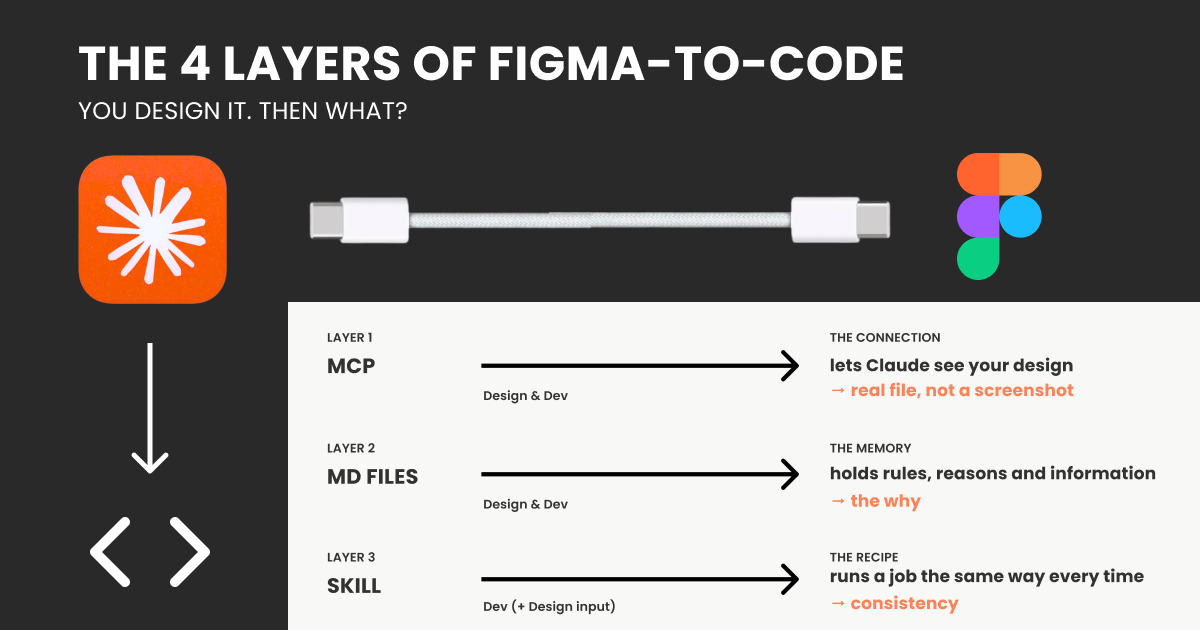
The one-line difference from a note: a note is background knowledge Claude always carries, a skill is a tool it reaches for only when the job calls for it.
Get Christine Vallaure’s stories in your inbox
Join Medium for free to get updates from this writer.
What it fixes:
The tasks you do over and over no longer come out slightly different every time.
The gap it leaves:
It is still something you write and keep up to date, and it still does not tie itself to your design. It is a very good recipe. It is not a wire connecting two rooms.
Layer 4: The mapping. The real wire.
Everything so far still leaves your design and your code as two separate worlds. This is the layer that finally joins them, and it is also the one that needs developers.
First, a word people throw around: the codebase. Your design lives in Figma. Your actual product, the thing people click and use, lives somewhere else entirely, in files that developers write and edit. That pile of files is the codebase. It is the real, working version of your product. Figma is the drawing. The codebase is the built thing. And if you are a solo designer making a quick website, you might not really have one, which is completely fine and already tells you this layer is not for you yet.
Inside a serious codebase, the real components live somewhere the developers can browse and reuse them: a catalogue of every real, coded button, card and input, with all its states, kept up to date by the team. The best-known tool for this is Storybook, though it is not the only one. The point is just that the code side has its own component library, separate from your Figma one. Figma shows the design of the button. That catalogue shows the actual working one.

The mapping is the wire between those two libraries. Its Figma name is Code Connect, but the picture is what matters: you formally tell the system “this button in Figma is that exact button in the code, and here is where it lives.” Once the wire is in place, Claude stops guessing (in theory, though it is not always that smooth) and stops building lookalikes. It points at your real component, the same one already running in your product.
What it fixes:
The drift. Design and code stop being two separate snapshots and start pointing at one shared source of truth. In theory, this is new tooling in the making; it is in use but not perfect, and is constantly being improved.
The gap it leaves:
It is real work, and it is not designer work. It is written in code, maintained by developers, checked whenever something changes, and wired into the way the product gets built. It has an owner and a running cost. Build it without a team to keep it alive, and it rots, because now everyone is trusting a wire that has quietly come loose.
The honest shape of it
Look at the whole stack. Each layer covers the hole under it. The pipe lets Claude see your design. The note carries your rules. The recipe keeps your repeated jobs consistent. And the mapping, the top layer, is the only one that truly welds design and code together so they never drift.
But that top layer needs a codebase, developers, and constant upkeep. Most people do not have that, and should not pretend to. So for almost everyone, the design and the code will drift the moment either side changes, and that is not a sign you set it up wrong. It is simply what these tools are without the expensive wire: they take a snapshot and build from it. When things drift, you regenerate. You do not try to hand-repair a connection that was never really there.
And one honest expectation: If you need more than a static HTML and CSS page, then generating code is not the same as having a live product. What comes out still has to live somewhere, get checked, and usually pass through a developer’s hands at some point. AI shortens the distance from design to code. It does not delete the road.
I am told to just skip Figma and vibe code
You will also meet tools that seem to skip this whole stack: you describe a screen or drop in a design, and a working app appears (Figma Make, Lovable, v0, Bolt and others). They are not cheating. I personally use them a lot, mainly Lovable, for small one-off products or in-house tools where I don’t care much about the design. Some examples to tinker with here. But the same limits apply underneath: they bundle the pipe, and maybe a little of the note, but they skip the mapping entirely and keep no memory of your system, so they build a fresh lookalike (you either connect Figma or they just make one up, usually in Tailwind), not your real component, and they drift the same way. Sidenote: Figma Make does look promising for changing this. I am still waiting on updates there.
These tools are great for getting something up fast. But the moment it has to be real, scalable, secure and built to last, the layers you skipped are exactly the ones you need.
So the rule of thumb is simple: reach for these to explore an idea fast or to ship something small or throwaway, and leave them behind the moment the design has to stay consistent or the code has to last and scale.
So, what should you actually use and do as a Designer in Figma?
Two things, in order. First, get your file clean. Then, match the stack to your size. That is the whole plan.
First: clean files before any layer.
All four layers can only work with what is actually in your Figma file. If your colours are loose hex codes instead of styles or variables, if your spacing is eyeballed instead of auto-layout, if your components are not really components set up in auto layout, then the pipe has nothing clean to read, and the result comes back messy. You do not need a perfect system to start with. But the tidier and more structured your file, the more every layer above pays off. These are simple principles to follow, but you need to know them. You can find a more in-depth article about this here, and I also run courses and workshops about this on moonlearning.io.
Good input is the cheapest upgrade you have. AI tooling moves fast, so be ready for when the pipeline catches up, basic design system principles, in every file, at every level. Full stop.
Then, match the stack to your size.
With your file clean, do not overengineer the rest. Add layers only as you grow.
Stop measuring yourself against a setup built for a company of hundreds.
So, back to our original image, and now it should make way more sense and hopefully calm the overwhelm: You will simply not worry about everything in every team. So let’s run through it, who uses what, and why.

If it is just you
You are solo, maybe a quick site or a product still finding its shape. You need two layers: the pipe and a note. Connect the Figma MCP so Claude builds in your real colours and spacing, and keep one short markdown note listing your reusable pieces and when to use each, pasted in every time. Skip skills until you catch yourself doing the exact same job every day. Forget the mapping completely, you have no codebase to wire it to and no developer to keep it alive. Design in Figma to think and decide, hand it over, and when the result is off, you regenerate. Your job here is taste, not plumbing.
If you are a small team
A designer or two, a developer or two, and now things go out of sync between people, not just tools. Someone updates a button, the code still has last month’s version, and nobody notices until it ships wrong. You need three layers: the pipe, a shared note everyone reads, and maybe one skill for the thing you build over and over. But the layer that actually holds you together is not a tool at all, it is a human habit: whoever changes a component in the code updates the shared note in the same breath. That promise between people is cheaper and more reliable than any wire you could buy at this size for now. You can look at the real mapping later, once your components have settled and stopped changing every week.
I would, however, expect this to change pretty soon. This is a known pain point, and players like Figma and Claude are pushing hard to be the first to fix it in a more usable way.
If you own a (serious) design system
You own the components that a whole company builds on, and you cannot eyeball your way out of drift, because hundreds of screens inherit your mistakes. This is the one tier where all four layers earn their cost, including the mapping. Wire Code Connect or similar to your real components in Storybook or whatever you use (your devs will know best), and add an automatic check that shouts the moment design and code fall out of line, like a smoke alarm. This is real engineering with an owner and a budget. Follow the pioneers in this field, like , and TJ Petri, for articles and developments. Agentic AI systems are a topic that moves fast and has its own universe entirely.
And the flip side holds: if you are not this team, do not build like this team, or you will spend your life maintaining a machine you never needed and cannot keep up with.
The one thing that stays yours
Whichever size you are, one part never moves down the stack. Knowing which of the ten versions Claude just made is the good one. Which spacing feels right, which button earns the attention, and when to stop. The layers move your work from Figma toward code. That is still you, and that was always the actual job. So move those designs by hand, make it worthwhile instead of looking at a generating loop all day, that is the side product.
Want to learn more?
If you want to learn about these new workflows in a practical, hands-on and honest way, the same way I’ve tried to write this article, I offer courses for individuals and train in-house teams. Just head to moonlearning.io or contact me for custom team training.
About the author Christine Vallaure
I’m Christine Vallaure, a UI designer, speaker, founder of the learning platform moonlearning.io, and author of theSolo, a book about independent product building. I teach UI design, Figma, and product building with agentic AI to people who want to understand what is actually going on under the hood, through online courses, team training, and conference talks.
Sign up for the newsletter to keep up.
Constitutionally incapable of writing a short article.