
In-System Design
Why builders hand you a lookalike, what has to exist before an agent can use your components, and the MCP setup I use.

Prototyping in code is what designers do now, at least according to LinkedIn. I tried it, and after two days I wanted to throw my laptop into the sea. Good news: I came out with a process I actually like, and that works, and that is what this article is. So here is what happened:
It started with every team I worked with suddenly turning up with the same frustration. They had connected their design system to an AI builder, described a screen, and got back something that looked finished. Leadership loved it. Then a developer opened the code, said something unrepeatable, and rebuilt it from scratch with the actual design system.
I did not understand it either at first. It was connected to the real design system, so what was wrong? So I started poking around the code, comparing it to the original.
The answer sits in the code, and that is the whole problem. Developers see it in a glance and are quietly furious: why are you handing me this? Everyone else sees a screen that works: looks fine, just ship it. Both are right; neither can explain it to the other, and this is how I ended up in my favourite workshops again: translating between the two.
This gap is not just awkward; it is expensive. Plans get made as if the AI prototype were most of the work, dates get promised on it, and then the rebuild happens quietly under pressure, while capable people work late to keep up with a speed AI promised, not understanding what went wrong and trying to fix it with more DESIGN.md files.
It happens often enough to have a name. Writing in Forbes, Yunhao Jiao calls it the prototype wall: excitement in week one, concerns around week three, abandonment by month two.
Before the solution (and yes, there is one, actually more than one), a quick look at what is actually going on. It takes a minute, and I know you want to skip ahead, but don’t; it helps you tell whether the next prototyping product you launch is useful when you work in a design system.
Why ready-made AI builders will not give you the output you need when working with a design system
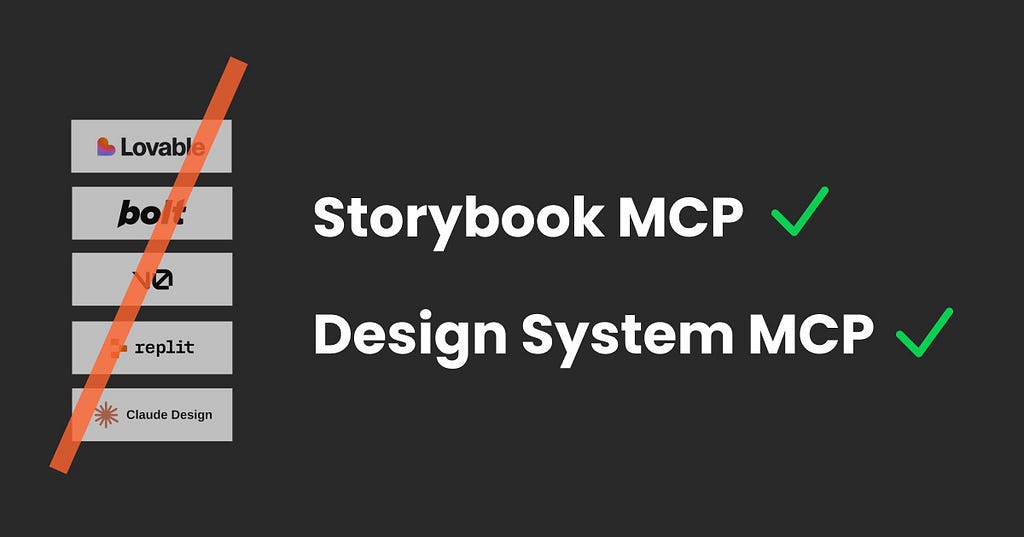
The Lovables, Bolts and Claude Designs of this world all have a little button that says connect your design system. Not false advertising; that would be harsh, and nobody is trying to trick anyone (who would do that in tech and AI?!). They do read your design system indeed, then build their own version of it, usually (but not all) on shadcn and Tailwind.

The first screen looks close. The more you prompt, the more it invents, and nothing that comes out points at your real components. Totally fine for a quick idea, but useless for something you have to build and maintain inside a design system to scale and ship. Different tools for different jobs.
Prompting harder will not fix it, and neither will another markdown file. The problem is not the instructions. The components are not real.
I started writing a breakdown of each builder, got halfway, and realised it will be out of date by the time you read it. So, two prompts instead.
Ask the builder, after it has generated a screen:
Show me the code for the primary button on this screen. Which file is that component imported from, and which props did you set? Do not change anything. Compare it to my original design system button and show me similarities or differences.
Or ask an AI to read the docs for you:
Read the official documentation for [tool]. Using only the docs, with quotes and links: when I connect my design system, does it install my component package and use my components with their props, or does it copy and rebuild them? Where does the generated code live, and how do I get it out?
Example: Claude Design.
I have to admit Claude Design surprised me; it does a better job than I expected. However, let’s look at the details because it is still (and this might change rapidly) not what we need: The marketing says it builds with your real design system components and checks its output against your system. The setup docs say Claude “extracts” them from whatever you give it: a codebase, design files, even slide decks. Those are two different sentences, so I gave it my own repo to prototype with and had a closer look at our all-time favourite component: the button.

Every prop, value and default came back right, and my CSS came with it, every token name intact, no invented colours. But Base UI had been dropped for its own helpers, my scoped classes had become global copies, and the types were gone. Its own handover note says it plainly: “This is a recreation for design and prototyping.” A very good copy, frozen the day it was made, that a developer cannot simply merge.
📌 Note, 26 October 2026. Claude Design moves into Claude in December, and their setup already flags the Claude Code route as the higher-fidelity one for React. So this recreation step may quietly disappear. Run the prompt above and you will know before I do.
What you actually need: a component list and an MCP
The difference isn’t a better prompt. It is two pieces: a list of what your design system really contains, and a connection the agent can ask through.
A list to pick components from: the manifest
A component in code is correct, complete and something you would have to read line by line to work out what it offers. A designer gives up halfway, and an agent burns through its budget wading through thousands of files doing the same.
What an agent needs instead is the component as a list. One entry per component: its name, what it is for, every property, every allowed value, every default. Write it once, generate it from the code, and add nothing. In most setups, that file is JSON and it is called a manifest, and it looks a bit like this:

Read it the way the agent does: there is a Button; it is the primary action trigger; it comes in four variants and three sizes; and unless told otherwise, it is primary and medium. That list has no room for a fifth variant.

Three things worth knowing about it:
- It is generated, not written. Storybook, for example, produces one from your stories and your component types. A script can write one. A custom setup usually keeps a richer version with tokens and patterns alongside the components.
- It is not documentation and not a design file. It is the facts, written once, so nobody has to interpret them. A very boring inventory list.
- It is yours. Any agent can read it, so it does not tie you to one tool. More important than you might think.
And it is why everything else becomes possible: the agent picks instead of inventing; it is cheap to read compared with a whole repository; checks become possible because there is something to compare against; and gaps become visible because anything that cannot go in the list becomes a conversation.
No list, no AI prototyping, however good your components are.
The connection: MCP, so the agent asks instead of remembering
The list has to be reachable while the agent works, and the standard for that is MCP, the Model Context Protocol: the plug that connects your design system, so the agent can ask what exists instead of guessing. You may know it from the Figma MCP, which lets an AI read your Figma file directly. In Claude, these are called connectors, same thing.

Without it, an agent answers from memory, and it has seen thousands of design systems, so you get the most common version of a button, with bits of yours mixed in. With it, every answer comes from your system, in this session.
Why it holds: no step trusts the one before it
Five things have to happen in a solid setup, and none of them is visible to you:
- Look it up, do not remember. Every session starts by asking the system what exists today. A model’s memory of your Button is the one thing you can be sure is out of date.
- Choose, do not invent. The agent composes from a closed list: these components, these values, these tokens. Nothing in the prompt should be able to add a fifth variant.
- Check against the system, not against taste. Automatically, before a human looks: are these real components, real tokens, does it meet the rules your team wrote down.
- Look at the rendered thing. Code that parses is not UI that works, and neither of you can tell from the code alone.
- A person decides. Everything green means the machine found nothing. It does not mean the work is good.
Two ways to get one
For prototyping with your own system in code, there are currently two realistic routes (check the date; this stuff moves fast). Both are built by developers. Your job is to know which one to ask for and what it costs them.
(There is a third, on the canvas side, where you prototype in Figma against a library that mirrors the code. Figma clicks into this far more smoothly than most people think, and it gets its own article, part 3 of this series, on 10 November 2026.)
Wait, can’t I just send the agent straight into the code?
In a small system, yes. My own website has a handful of components, and setting all of this up there was overkill. In a real system it breaks in two ways. The first is noise: the agent wades through thousands of files, internal helpers and types, which is slow and expensive. Storybook’s own test found its MCP used 27% fewer tokens and finished almost three times faster. The second is drift: code shows what exists, not what was intended. A product repo holds every old version, every one-off and every hand-built copy, and an agent copies whatever it finds most of, so the drift spreads. The MCP answers only with what the system sanctions. A custom one adds what code can’t say at all: the patterns your team agreed on and the rules that check them.
Where exactly the line sits, I don’t know, and I haven’t seen anyone put a number on it. The signs are easier to spot: the agent rebuilds a component that already exists, copies an old pattern instead of the current one, or sessions get noticeably slower and pricier. If you’ve found where that point is for your team, I’d be happy to hear it. Till then let’s have a look at our option and you just give it a go:
1. The Storybook MCP, the quick and easy route.
Most design systems already have a Storybook, which is why I start here with teams.
In case you have not met it: Storybook is a website that shows every component in your codebase, live and clickable. It lives inside the code itself, with a small stories file next to each component listing its examples, so what you click through is built from the real thing.

That part you probably already have. The Storybook MCP add-on is what lets an agent use it too: it passes your component list over, so you prompt and get a prototype made of real components. Most of what I described above comes with it, the list, the preview, running your tests, and even the wording for your rules file, since the docs hand you a snippet that tells your agent never to invent a property. What does not come with it are the gates at the end, which stay with your team’s checks.

Normally your developers set this up once and give you a branch to prototype on, and that is the version I would ask for. You can also do it yourself, which is what I did. Start on a playground design system rather than the real product: I keep a small one for trainings, and any little open-source system works too. If it has no Storybook yet, that is fine, your agent can add one.
One thing to sort out first: you need an agent that works inside your project, like Claude Code or Codex. What that means in practice is that a design system is a folder of files. You download it, you open that folder with Claude Code, and from then on the AI can read those files, change them and start things up on your machine. A chat window only ever sees what you paste into it.
Then give your agent this:
Set up the Storybook MCP in this repo, following the official docs at https://storybook.js.org/docs/ai/mcp/overview. Install the add-on, switch on the components manifest, add the MCP server to my agent, and paste the agent instructions snippet from the docs into my agent’s rules file, whichever one this project uses. Then verify by listing all documented components, and tell me what you changed and anything you could not do.
What it needs: Storybook 10 or newer (it will tell you if you do not have it, and the prompt above updates it), the components manifest switched on since it is off by default, and either a branch you are allowed to work on, which your dev team sets up, or a local playground folder you connect to. After that the agent can see your components and their guidelines, find and write stories, show you a preview, and run your tests.
Using the Storybook MCP to prototype
Point your agent at the folder or branch you are allowed to work in, then ask it to open Storybook. It starts on your own machine, at an address like localhost:6001, which is a website only you can see. Nothing is published, nothing leaves your laptop, and you can close it again by stopping it.
Then I just talk to it:
Using the Storybook MCP, make a separate section for prototyping, and create my first prototype: a sign-in and a register page. Use only components from my system. If something does not exist, piece it together from what is there, mark it clearly, and tell me what you had to invent.
A minute later there is a prototyping section in my Storybook with a page made of real components, clickable, running locally.

📌 Tip: I always ask for a short list underneath of what it used and what it had to make up. I still do “need” to invent here and there, but I need to know.

That is the whole experience from where I sit. A prompt and a result, with all the machinery out of sight, and something to hand over that makes sense to a developer.
Add a skill long term
By the third run you will be typing the same corrections. That is the moment for a skill: a packaged set of instructions your agent loads automatically for this job. Mine says which components may be used, how to mark anything invented, and what to write underneath. One safety note, since a skill can run code on your machine: install them from people you trust, or have a developer look first.
2. A custom design system MCP, the serious route
What a team with engineers builds for its own system, and where the best results come from, because everything in it is shaped around what that system actually holds.
The gist is always the same. A server answers from machine-readable files about the system: every component with its real properties, every token, and the compositions the team has agreed are the right way to build a pattern. The agent has to query that before it writes anything, the generated code gets checked back against the same files, rendered so somebody can look at it, reviewed by you, and run through the team’s automated checks before anything merges.
Beyond that they differ a lot, and the ones I have seen vary in what they hold, how strict they are, and where the checks sit. Brad Frost was kind enough to give me a tour of his, which goes by the name Eddie, and it was quietly mad: I had a conversation with it and watched a page assemble itself in front of me, theme changes and all, in something that is not a chat window. I later worked through the course he runs with Ian Frost and TJ Pitre (no advert; it just truly helped me), which is where the pieces finally clicked for me. I am building a small MCP for my own products and for teaching now, from the design side rather than the engineering one, enjoying it more than I expected and learning a ton.
Another interesting read about building custom prototyping tools with AI is this one by Atlassian, published in November 2025
Using a custom design system MCP
You still point your agent at a branch and describe a screen. And this is the experience you should have working with it.

The difference is what happens out of sight: it asks a system built for exactly this, so it knows your patterns as well as your components; it knows which combinations your team has blessed, and it follows your rules rather than a generic snippet. You notice it in the small things: fewer corrections, fewer invented layouts, and a gaps list that is about your product instead of about the tooling. The one I saw was also significantly faster, close to real time at times. The cost is that somebody has to build and keep it, which is why it belongs to teams who ship a system rather than to one designer with a playground.
Which one to ask for
- No Storybook, no engineers to spare: fix that first. Nothing here works without a component list, and Storybook is the cheapest way to get one.
- Small teams, Storybook already there: ask for the MCP add-on, the manifest switched on, and a branch to work on. An afternoon of developer time.
- Enterprise with a design system team: they will most likely build a custom MCP, because they can staff it. More power, and more governance to agree before anything moves.
- Nothing is ready: do not reach for a builder to fill the gap. Clean up what you have, and prototype in Figma against a library that mirrors the code until the code side catches up.
Either way, this infrastructure is development work. What a designer can do is ask for the right three things: a component list, a connection, and branch access.
Oh no, but I already have so much vibe-coded work!
In the long run, I recommend one of these approaches outlined above; however, there is a really fun Skill by called vibe killer by Brad Frost that gets all your vibed mess back into the system. I haven’t personally used it in a real setup yet, but go for it and tell me how it went. It looks very promising, and I love the name.
Handing off an AI prototype
The prototype still gets rebuilt, and knowing what happens next changes how you build it.
In a decent setup, you work on a design branch (it could be called anything; I took the naming from this article by TJ Pitre, as it makes a lot of sense) and hand over what you built. The design branch itself is never merged. Accepted ideas are rebuilt on a feature branch, and that is where the pull request happens: a formal way of saying, come and look at this before it goes in.

Then: developers add what a prototype does not have: real data, loading, errors, empty states. Then come the automated checks that run on every proposed change, which is what people mean when they say CI: tests, accessibility, responsiveness, whether everything used is a real component, and performance. Some teams add an AI eval that reads the change and asks whether it follows the rules and does what the ticket asked. Then a person approves it, because a green build is not a yes. It runs through all of this stuff; you don’t need to know the details, but you need to know it is there.

So why bother, if it gets checked and partly rebuilt anyway? Because the rebuild is cheap when the parts already exist. A developer transcribes decisions instead of reverse-engineering a picture.
Also, you find out now, while it is still a prototype, whether the system can express what you designed. And the thing you hand over behaves, so you can test it with people instead of asking them to imagine a click.
If you get the chance, ask your developers to show you what their checks do with your prototype. One session of that will teach you more than a year of handover templates.
📌 Tip: this is the step your prototype walks into, and somebody has already automated it. Brad Frost has published skills that carry a finished Storybook page into the product’s codebase and all the way to a pull request, with a build, a side-by-side comparison and accessibility checks on the way. Send it to your developers, and read it yourself: it spells out what a careful handover actually involves, which is useful the next time somebody tells you the prototype is basically done.
What this does not solve
- It needs a system worth prototyping with. Messy components produce tidy-looking nonsense.
- It does not tell you what to build. Perfect components plus no knowledge of your users gives you consistent, average screens.
- It is not production code, however real it looks.
- There is no established workflow yet, mine included. This is a few months of my own trial and error, and the parts I would bet on are the component list and the checks, not my exact prompts.
- Both sides, design and dev, have to move. Designers need to get near a codebase, which starts with asking for access. Developers need to make the system readable and open the door. Neither is a tooling problem.
And the canvas? Very much alive
Remember the laptop I wanted to throw into the sea? Everything above fixes most of that, not all of it. Prototyping in code is useful, and handing over in code matters more than ever, but I still do my best thinking on a canvas, with several versions next to each other and notes beside them.
Ditching Figma has become a sort of credential this year, and I have yet to see a link between how loudly a tool gets declared dead and the quality of what ships. Figma is also moving: it has shown something called Code Sources, still in closed beta, which would let a Figma file point at the real components in a codebase instead of at a copy of them (neither Make nor Code Layers do that today). And now you know what that means! If it ships the way it was demoed, a good part of what I do by hand disappears. Nothing here depends on it, and it is the release I am watching most closely.
Until then, I do not have to choose. When your Figma library mirrors the code, the same agent works on both sides, and a prototype can move between them made of the same real components. I want to work where the work is best done, wherever the job needs me that day, and I call that In-System Design. The canvas half of it is part 3 of this series, out on 10 November 2026.
Sources:
The custom MCP thinking in this article owes a lot to Brad Frost, Ian Frost and TJ Pitre’s course.
The Storybook details come from their MCP documentation.
📖 Words in this article
- MCP (Model Context Protocol): a standard plug that lets an AI connect to a tool like Figma or Storybook and read from it or act in it.
- Manifest: the component as a list. Every property, allowed value and default, written once, generated from the code. Storybook can produce one, switched on in its config.
- Storybook: a website that shows every component of a codebase, live and clickable. It lives inside the codebase rather than keeping its own copy.
- Story: one example of a component, written next to it in the code.
- Props: the options a component has in code (size, variant, disabled). Figma calls them component properties.
- Design branch: a parallel copy of the codebase that developers set up for designers. Nothing you do there can reach the product. I read this idea first in an article by TJ Pitre.
- Pull request: a formal proposal to change the real product, reviewed before it is accepted.
- CI (continuous integration): checks that run automatically on every proposed change.
- Eval: an AI reading the work and judging it against a standard. Useful, not deterministic.
- Skill: a packaged set of instructions an agent loads automatically for a recurring job. Powerful, and worth vetting before you install one.
- In-System Design (my term): designing with the real components of the system, on whichever surface the task needs, instead of next to the system in a tool that rebuilds it.
About the author: Christine Vallaure
I’m Christine Vallaure. I design, I teach, and I spend an unreasonable amount of my time on articles like this one. Through moonlearning.io I teach Figma, design systems and AI workflows to designers and teams. Along the way I speak at conferences like Figma Config and Smashing Conference, mostly about where design meets code, and I am a member of the Awwwards jury.
I write these articles with an AI assistant, from my own notes, recordings and repositories. The thinking, the examples and the opinions are mine, and so is the final wording and tone.
Sign up for the newsletter to keep up.
Constitutionally incapable of writing a short article.
AI Prototyping inside your design system. A hands-on guide for design & product teams. was originally published in UX Collective on Medium, where people are continuing the conversation by highlighting and responding to this story.