

The promises of automation can only come true if you’re working smarter, not harder

Lately I’ve been suffering from hot dog hands. I don’t know who else needs to hear this, but I need to hear this: You’re trying to do too much. You can’t be everything, everywhere, all at once. You can’t learn every new tool, try every AI platform, and automate everything that slows down your workday. And because you’re trying to do too much, you’re not even getting anything done!
With more than 3 months of 2026 behind us, I can’t quite put my finger on why I feel less accomplished this year (maybe it’s the hot dog hands). I suspect that it’s because I’ve spent the last several months bombarded with new ways to be productive at work. Figma has added new ways to connect to projects using its MCP server. Claude Code can now turn code back into Figma components. Cursor introduced a new visual mode for designers. With each announcement, my colleagues and I gush about the potential. We could automate our QA process. We could automate our sprint tickets. We could build a Figma plugin that does every task we used to do by mouse.
There are so many ways to be more productive that it’s getting in the way of my productivity. Looking back months later, not many of those coulds ever became dids. And not for lack of trying. But I now have several unfinished Cursor projects, a half-baked attempt to translate human-readable design system guidelines into machine-readable guidelines, and a couple ideas for Figma plugins that started to branch into more learning side quests which only reminded me to finish my previous side quests before I go any deeper.

And a couple times a day, someone asks me if I’ve seen this new tool, or checked out this link, or if I have an opinion about whether Glonk* could help us optimize a tedious process.
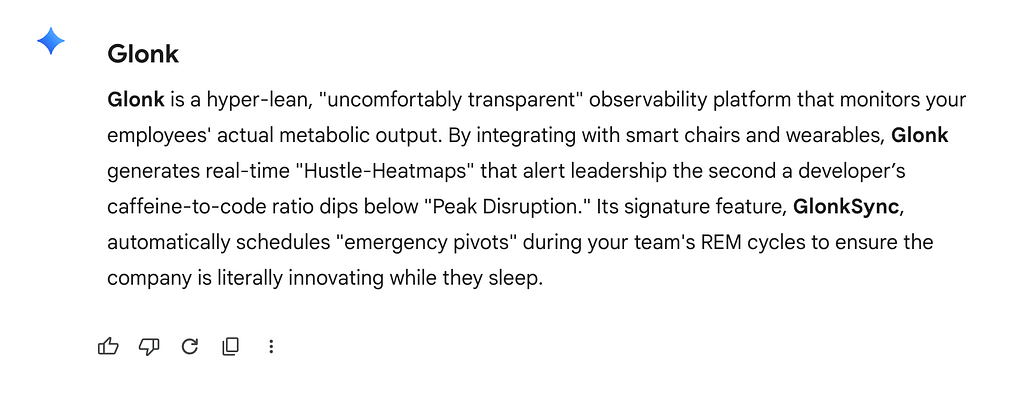
Even if it could, would the time investment pay off compared to the tedious process? Sometimes it’s easy to forget that these tools are supposed to make us less busy. Instead, we have aspiration bloat.
Do or do not; there is no try
What underlies this anxious barrage of new AI tools is a pressure to be fast, be first, and out-compete every other designer who has access to the same tool. And that pressure is real. Every company is trying to avoid getting edged out of a rapidly shifting market segment. But maybe the lesson in that is less about the urgency and more about the volatility.

With so many new tools at my fingertips, one of the challenges slowing me down is the illusion that I need to back the right horse in this race. And the more I wallow in analysis paralysis, I realize that things are so volatile it’s not worth trying to get the gamble right. So rather than racing to be the first, or trying to keep up with every brand new thing, I should see one project through to the finish line, even if the race veered off course several miles back. Much like it no longer matters which programming languages you know, the higher-level problem-solving skills will be what’s important years from now.
Go prompt yourself
Seeing one project through to the finish line is easier said than done in the Generative AI world. Generative tools tend to give us a false progress fallacy: within a few minutes and a couple prompts, you can have something that looks so convincingly 80% complete that you’ll ignore the many more hours and hundreds of prompts it will take you to finish that last 20%.

But if you’re feeling outshined by these automated tools, remember that even they require help to stay focused. LLMs suffer from the same analysis paralysis as humans and that’s why contextually specialized AI agents perform better than generalists. It’s also why the remaining 20% of projects require the human finesse of hundreds more prompts — specificity is important.
Aalap Davjekar outlines these 3 keys to a good prompt: role and context setting, clear objectives and constraints, and output format definition. I don’t need to add to the long list of guides for how to prompt an LLM. But before you can write a good prompt, you need to define those key elements for yourself. This is a design skill that you can’t automate away. It’s easy to have an idea and let the AI tool “figure out the details,” but if you don’t write down a specific goal for yourself, what this project is supposed to achieve, how and when it would be used, and what the output should look like, then you won’t have a way to know when you’re done. (Productivity hack: recognizing what done looks like is pretty important when you want to get something done.)
It probably sounds obvious. It should be obvious. But it’s easy to lose that north star when we have so many tools handling the thinking for us.
Work smarter, not harder
As the title reads, I’m issuing you a challenge to do less with AI. But I chose those words carefully. This challenge is a grammatical choose-your-own-adventure:
- Do less, with AI: Use AI. Embrace the new tools that are popping up around us. But as you tinker and experiment, remember that Generative AI is supposed to save you time, not inflate your backlog. It should be helping you do less.
- Do, less with AI: No matter how many new AI skills you’re mastering, you’re not saving any time if you’re not doing. Just like you’re not saving money when you buy a discount item you didn’t need, you’re not benefitting from a tool that automates a task you weren’t going to do. Cut out the endless side quests by reminding yourself what you’re trying to accomplish.
- Do, less with AI: Remember which one of you can touch grass, watch a sunset, and feel emotions. Use more AI if it helps you use less AI, but resist the temptation to get sucked deeper into the digital world. Let the time you save make you more human, not more entrenched in the world of your digital assistant.
Most importantly, just do.
10x zero is zero
Admittedly, I’ve been on quite an AI adoption arc, from skeptic and brake-pumper to later leading workshops about LLMs and designing AI assistants. By now, I can’t help but embrace that the future of design is AI-driven, and that future designers need to be tinkerers.
Another industry trend I’ve resisted over the years is the 10x mindset (or grindset, if you will). And while I don’t believe that AI tools will make us 10x as productive (we’re certainly not working 1/10 as hard), I do expect these tools to act as multipliers on our output.
So here’s some math I don’t need the help of AI to solve: 10 x 0 is 0. Keep doing. Keep creating. Use as much or as little help from AI tools as you need to, but don’t let the speed of technology slow you down.
Do less with AI was originally published in UX Collective on Medium, where people are continuing the conversation by highlighting and responding to this story.