
An introduction for designers
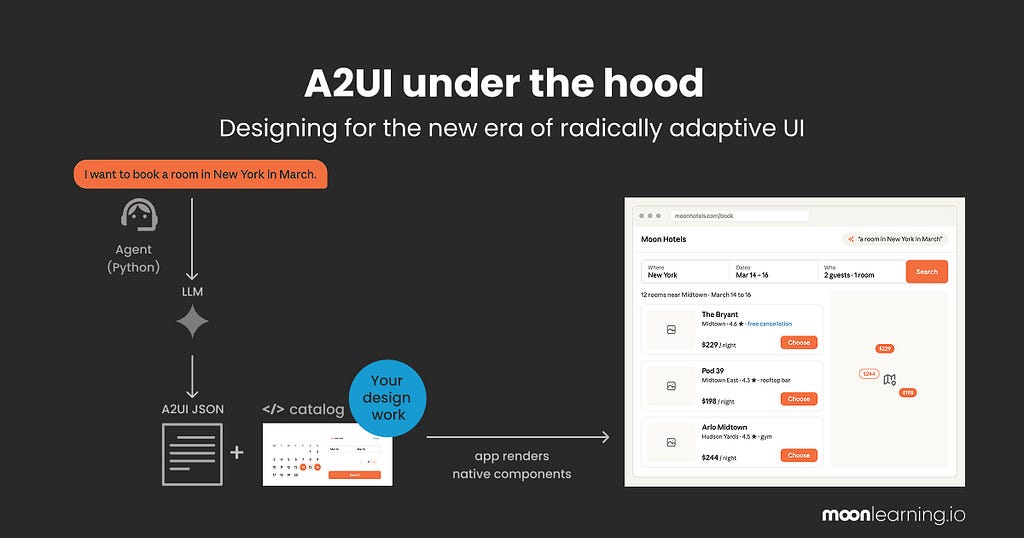
As a designer, I am optimistic about this one, and that is not my usual reflex with AI interface design.
You have probably never heard of it. That is fine, almost no designer has. A2UI still lives in developer corners, written about in code. The idea underneath is worth meeting early, though, because it changes what we do.
So let me start with the idea, not the acronym.
Think about how we design today. One screen, or one flow, aimed at an imagined researched user. Everyone who arrives gets more or less the same thing, and we hope it fits.
Now picture that flipping. The interface is built fresh in the moment, for the exact person or the exact thing they asked for. I do not open my banking app and hunt through menus and dashboards built for everyone. I ask where my money went this month, and I get back just that: a simple chart by category, with the one surprise expense already flagged. You ask, the screen you need appears, then makes way for the next one.
This is a new approach, called Generative UI or radically adaptive UI. It is early. The spec is young, most of what exists is still demos, and there is no solid pipeline from design to code yet. But it is already running in a few real products, and it is moving fast enough to be worth your attention.
A2UI is one of the things that makes it work. It is not a tool or an app you install or buy. It is a protocol, a shared language sitting between an AI and your interface. So when you “use A2UI,” you are not opening it, you are building your app to speak it. Google started it and put it out in the open, with CopilotKit and others now shaping the spec. It sits alongside related protocols like A2A and AG-UI, but no more jargon, let's look at what this is and what it means for us.
It is not the only one. There are others, like json-render by Vercel and MCP-UI and surely many more. But I am focusing on A2UI as an example.
Why am I optimistic
It moves us away from generically generated AI interfaces. The kind built from div soup and more classes than you ever sat through at school. No offence to Tailwind, it is clever and I reach for it constantly when I am exploring. It just should not be the standard for the web we put into the world. You are welcome to disagree.
The reason is simple: an approach like A2UI only ever builds from a given catalogue of elements. Elements a designer made first, implemented in clean code, with solid CSS, the edge cases handled and accessibility looked after.
Built the way things are supposed to be built. The interface is then assembled fresh for each request, which is the radically adaptive part.
This is not only a UI but also a huge UX shift, because the pre-built persona we usually design for, this made-up average user, quietly changes in this scenario.
What we get instead is better: an interface that fits the actual moment.
This is our new homework as designers
To design for this, we need to understand how it works. Not in deep technical detail. Just the way we already understand what a component is, how a variable becomes a token, and how to name that token so it lines up with code.
It is not fully here yet. It is moving, and right now, it is mostly developers building and deciding how it works. So let us demystify it and take the seat that is ours. The official A2UI diagram is a stream of JSONL messages, which I suspect just lost most designers in the room. Let us turn it into something our visual heads can hold.
First: What the user actually experiences
Let us make up an example. We run a hotel chain across the US, and we add an AI-driven interface for our users. Here it shows up as a reply in a chat, but the same screen could just as easily be the whole app, or a panel beside it.
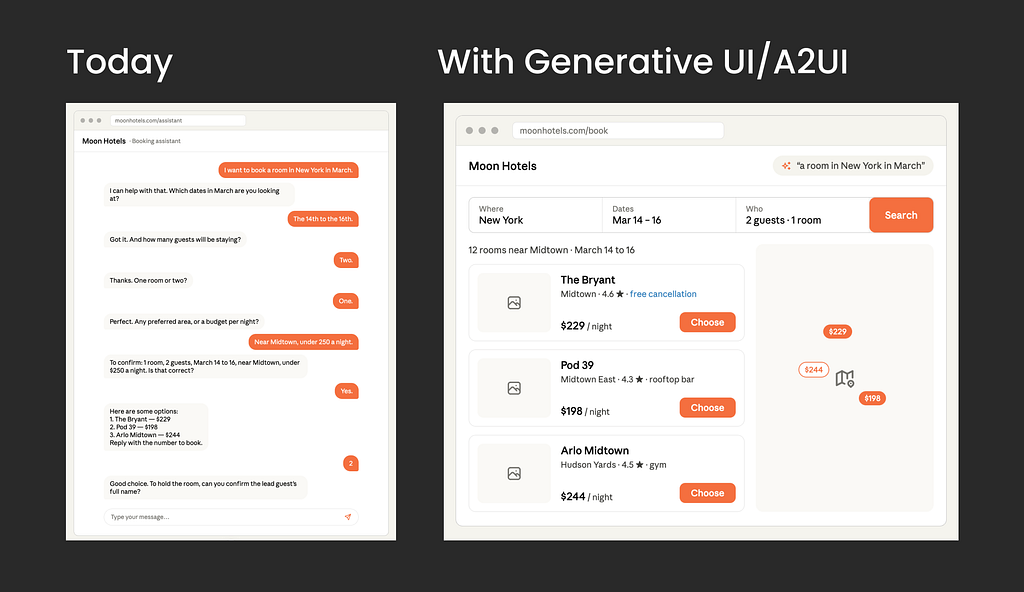
User experience today (June 2026)
You get either a fixed page or a chatbot, and you tell it you want a hotel in New York in March. It asks for the exact dates, and you type them. It asks how many people. Then check-in, then check-out, one question at a time. If you have ever booked a flight over the phone while trying to compare prices, you already feel the pain in your shoulders.
User experience with radically adaptive UI like A2UI
You say, “I want a room in New York in March,” and it shows you the interface you need. For example, a calendar for the dates, prices visible in case you are flexible. A stepper for the guests. If you had asked what hotels are available instead, it would show a list with photos and prices.
For the user it is simply this: I ask, and I get exactly the screen I need. Nothing else.
The interesting question is what happens between the asking and the screen, and where we step in, for us designing this experience:
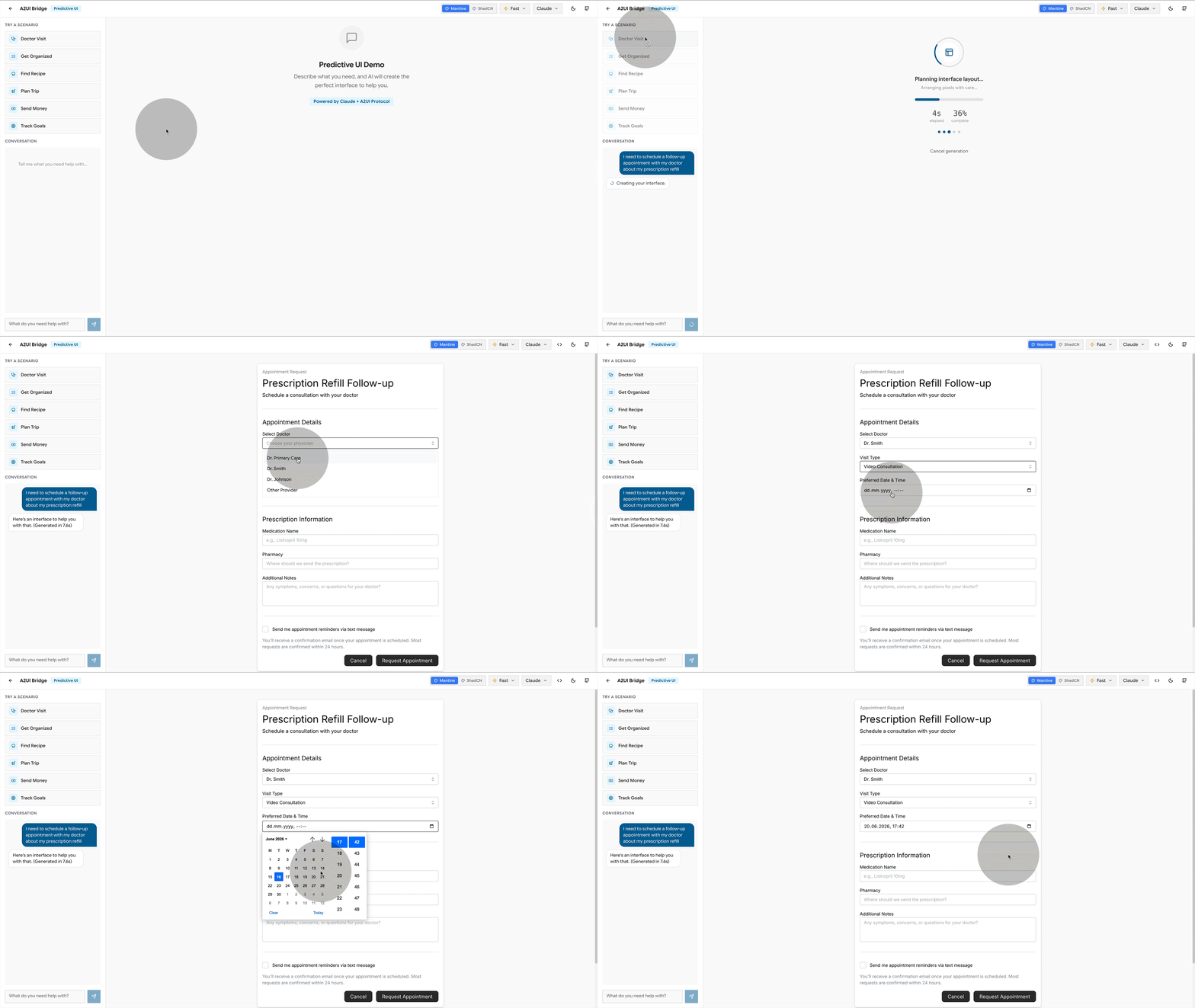
There is a great little demo tool by Southleft to play with for a first experience. This is all brand-new stuff, but you get the gist.
How it works under the hood
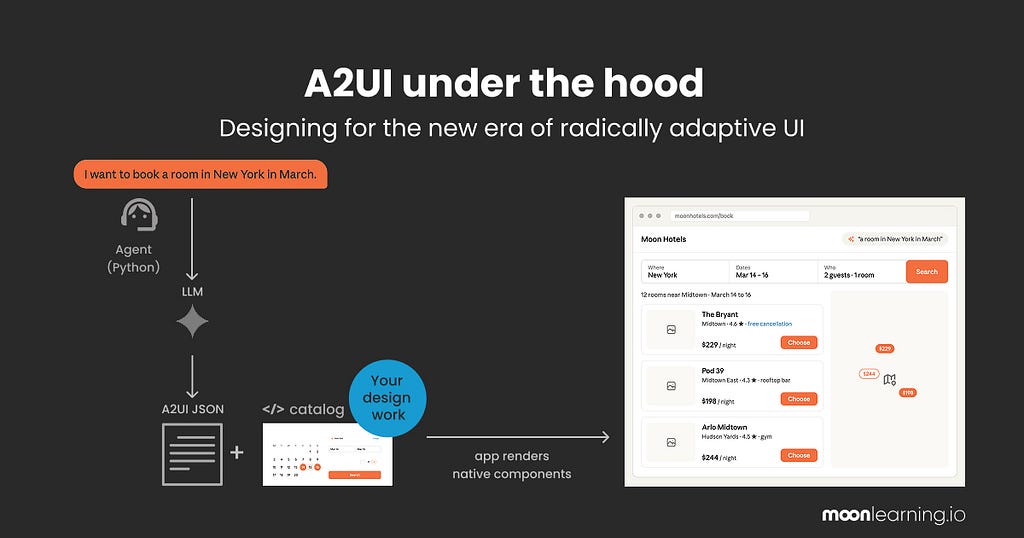
Two parts do the work, with off-putting names. Let me make them plain.
- One part decides what screen you need and writes the recipe for it. It sits on a server, out of sight. The docs call it the agent.
- The other part is the app in your hand. It takes that recipe and builds the real screen from your components. The docs call it the renderer.
The recipe is just the agent’s instructions for one screen: which of your components to use, and how to arrange them. Written fresh every time you ask for something. And it can only name components that already exist in your system, which is exactly where we come in.
Ok so how does that work step by step?
This is what we get on the official A2UI page. Lovely if you are an engineer, scary for designers.
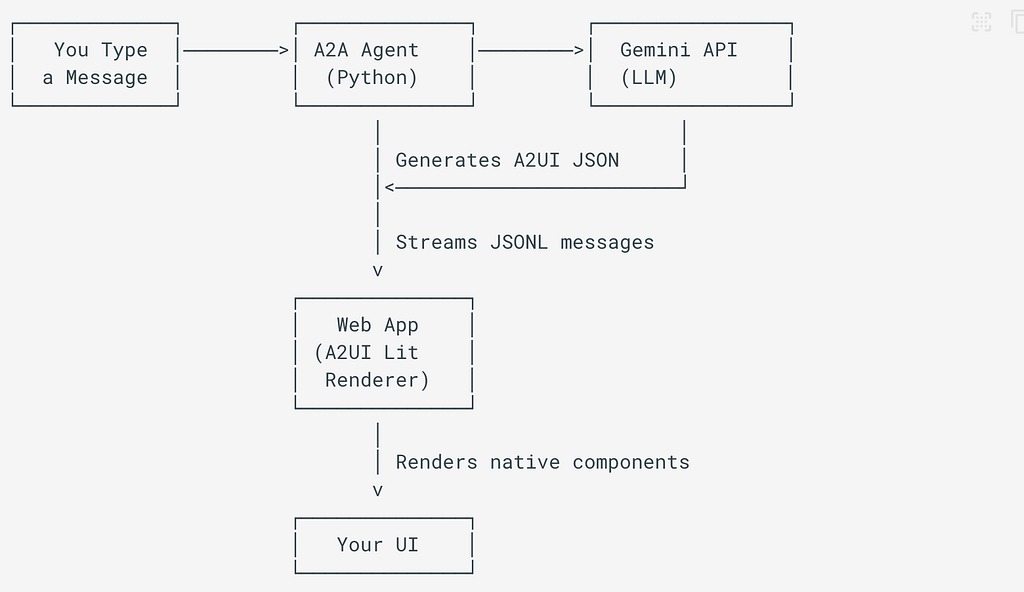
Let’s make it designer-friendly, shall we? Here we go:
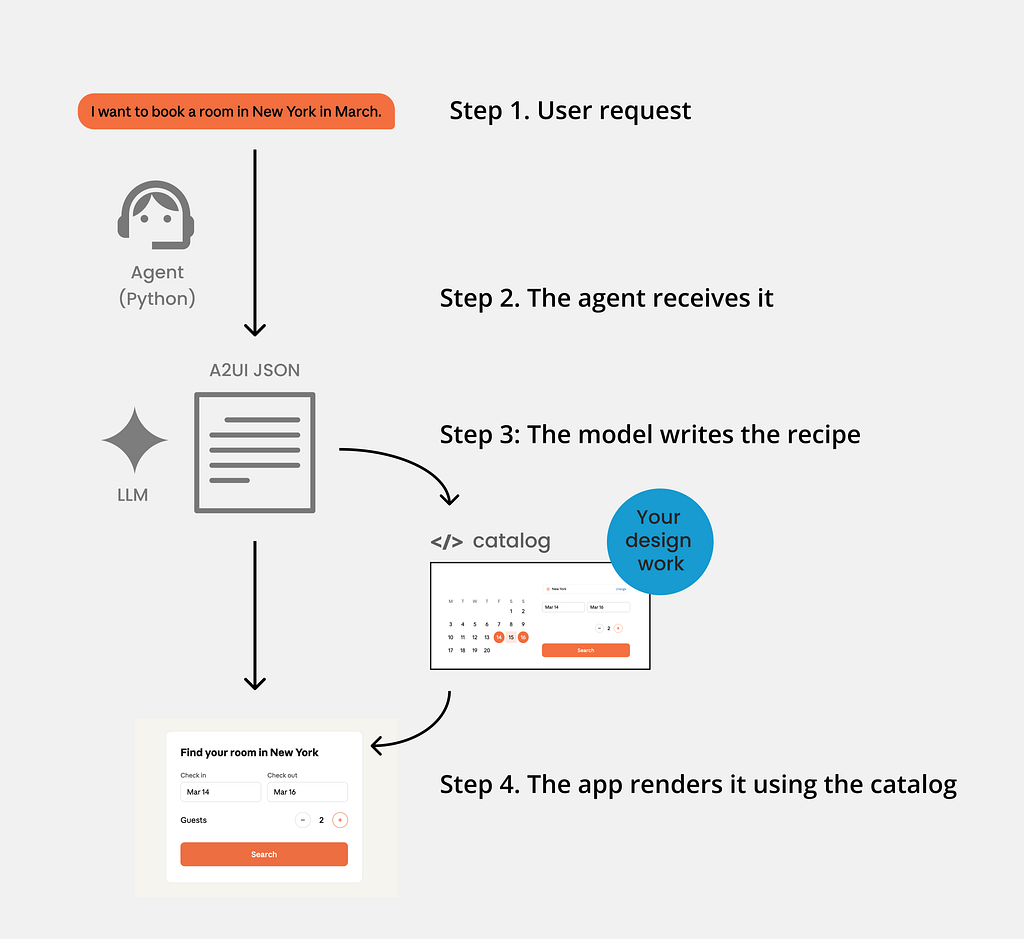
Let’s run through it step by step.
Step 1. You ask
The user types or says a plain request: “I want a room in New York in March.”

Step 2. The agent receives it
A small program on a server (often Python, using the A2UI Agent SDK). It bundles the request together with your catalog and instructions, and passes that to an AI model.
Step 3: The model writes the recipe
An LLM (as this A2UI is Google, this would be Gemini, but it would work the same for others) returns a structured description of the screen needed: A2UI messages, streamed line by line as JSONL. This is what some call the “recipe”.
A simplified contract for our request could look like this:
{ "version": "v0.9",
  "createSurface": { "surfaceId": "hotel-booking",
    "catalogId": "https://moonhotels.com/catalog/v1/catalog.json" } }
{ "version": "v0.9",
  "updateComponents": { "surfaceId": "hotel-booking", "components": [
    { "id": "root",   "component": "Column", "children": ["title","dates","guests","search"] },
    { "id": "title",  "component": "Text", "text": "Find your room in New York", "variant": "h1" },
    { "id": "dates",  "component": "DateRangePicker", "value": { "path": "/booking/dates" } },
    { "id": "guests", "component": "Stepper", "label": "Guests", "value": { "path": "/booking/guests" } },
    { "id": "search", "component": "Button", "variant": "primary",
      "action": { "event": { "name": "search_hotels" } } }
  ] } }
You do not need to read JSON fluently to see it. Each line names an existing element or component (a Column, a Text heading, a DateRangePicker, a Stepper, a Button) and a few properties. A parts list with an arrangement.
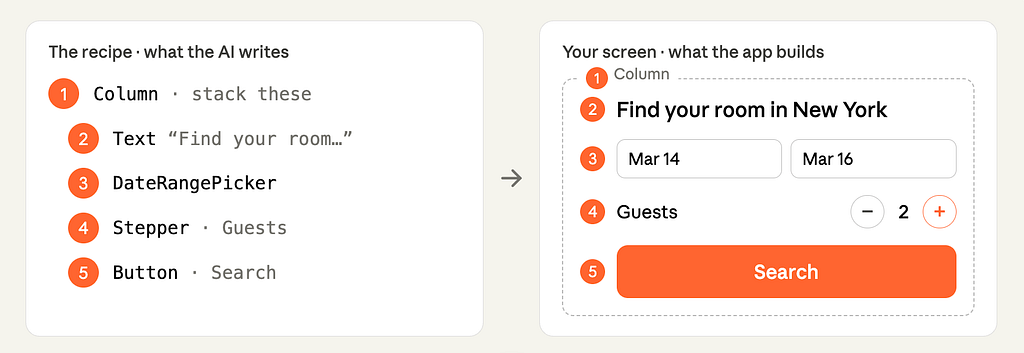
Here is the bit that should make a designer sit up. The model can only name components that exist in the catalog.
It does not invent a date picker, and it does not generate a random one-off widget. A2UI checks the recipe against the catalog before it is sent and catches any property the model tried to make up. The app checks it again on arrival. No more generic…well, you name it.
So “it cannot invent” is not a hopeful promise. The agent generates, a validator checks it against your catalog, and it self-corrects before anything reaches the screen.
That constraint is the whole point, because it hands the next step entirely to us.
Step 4. The app renders it using the catalog
The renderer, the user’s app on web, mobile or desktop, reads the recipe and builds the real screen from your catalog and your catalog only!
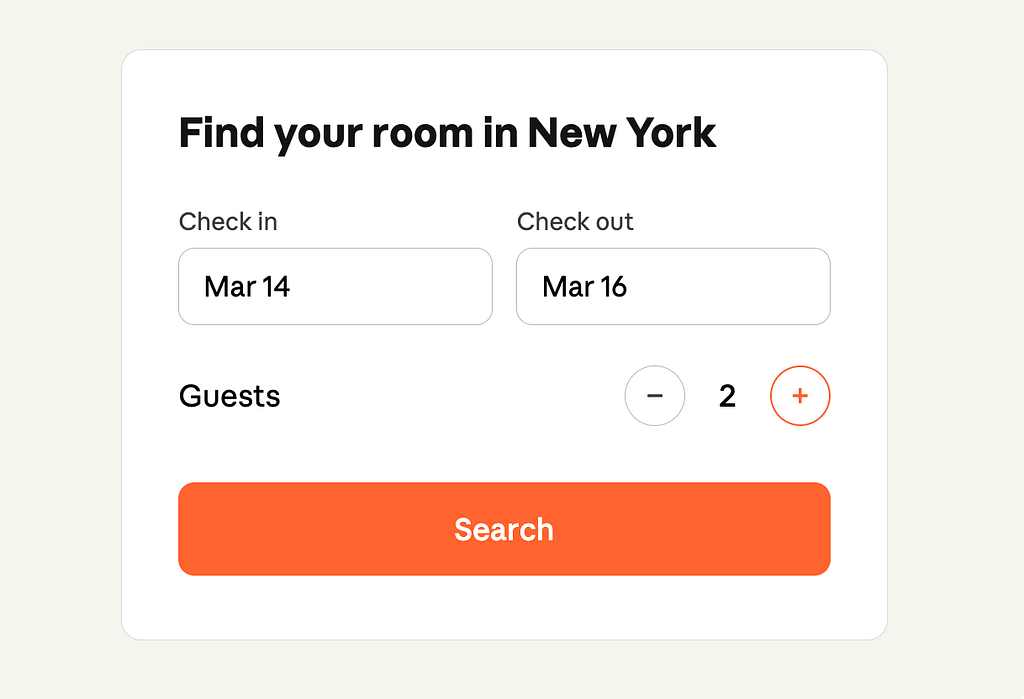
The intelligence decides what to show. Your design system decides what it looks like and how well it works.
Where design comes in
Everywhere that matters! And this is the stuff that excites me after years of generative AI designs running wild in design:
The entire catalog is design decisions. Not a generative free-for-all. Real design thinking, made readable to a machine.
Does the catalog hold styles and tokens, or only components?
Both. The A2UI catalog is defined as the components the agent may use, the functions it may call, and the styles and themes that go with them, plus instructions for using all of it. Your theming and tokens live here too, not just your buttons.
And the components are not only tiny primitives. The catalog can hold a plain Button and Text, but it can just as easily hold a HotelSelector or a FlightCard, a rich, branded component you designed for exactly this product.
You are not handing the machine a box of Lego bricks. You can hand it whole pre-built rooms.
Catalog versus design system
Not the same thing, and the difference is clarifying.
Your design system is the broad human thing: the Figma library, the coded components, the tokens, the docs, the taste behind all of it.
The catalog is the slice you expose to the agent, in a format it can read. The menu it is allowed to order from. The official guidance is to build it to mirror your design system, so the agent is held to your exact components and visual language.
One idea, three layers: the system you think in, the contract you expose, the code that runs.
Where it breaks
Here is the honest part: because the constraint that protects you is also the ceiling. The agent can only name what is in the catalog. So when someone asks for a moment you never designed for, it cannot invent its way out. It does the next best thing, and “next best” is exactly the problem. It reaches for the closest component you did build, even when that is a poor fit. It falls back to the plain, basic set that ships with A2UI, the generic look the whole approach was meant to kill. Or it gives up on a screen entirely and drops back to chat.
And note what the validator does and does not catch. It catches an invented widget or a made-up property. It does not catch bad taste.
A list where a map would have been kinder, a stepper where a calendar was the point, a screen that is technically valid and still wrong. Nothing in the pipeline flags that. The only thing standing between the user and a near-miss interface is whether the catalog had the right piece in it.
So the failure mode is not a crash. It is a quiet downgrade, and it lands on us. Every gap in the catalog is a gap the user feels. That is not an argument against A2UI, it is the clearest possible argument for the job: the screens are only ever as good as what a designer put in the catalog to begin with.
Why this is huge
For years, the careful work, the naming, the states, the tokens, the accessibility, felt like a tax. Worthy, invisible, first to be cut when the time and budget were pressing. Here, that same work becomes the engine. The catalog is the only thing the agent can build from, so the quality of every screen a user ever sees is set by what a designer put in it. Not by a developer interpreting a mockup later. By us designers, upstream, on purpose, into each little element and component.
That is more control over the final outcome than designers have ever really had.
It only works if there is something worth assembling in the first place. Making sure of that is the job.
So what prepare as Designers?
You do not need to learn to write a catalog in JSON. You need to become the person who makes a catalog worth writing.
Whatever an agent reads, we own. In A2UI it is the catalog. In another setup it will carry another name. The label changes, the responsibility does not. The machine builds from a source, and a designer defines the source.
For now, that source still starts in Figma. I do not care what you say: if you do solid design, you need a canvas to think on, otherwise you get the generic stuff I see everywhere (feel free to surprise me). Today, that canvas is Figma.
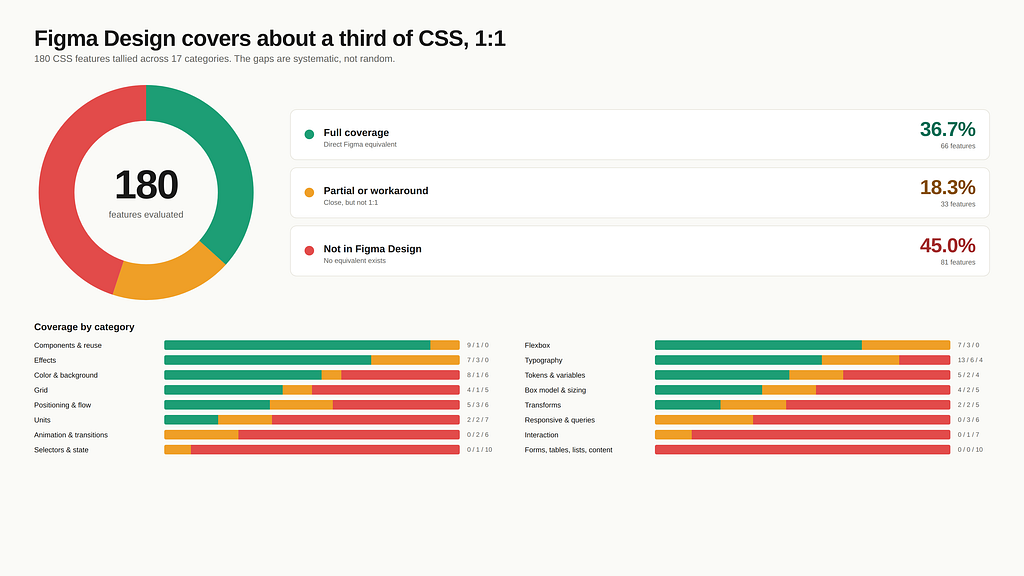
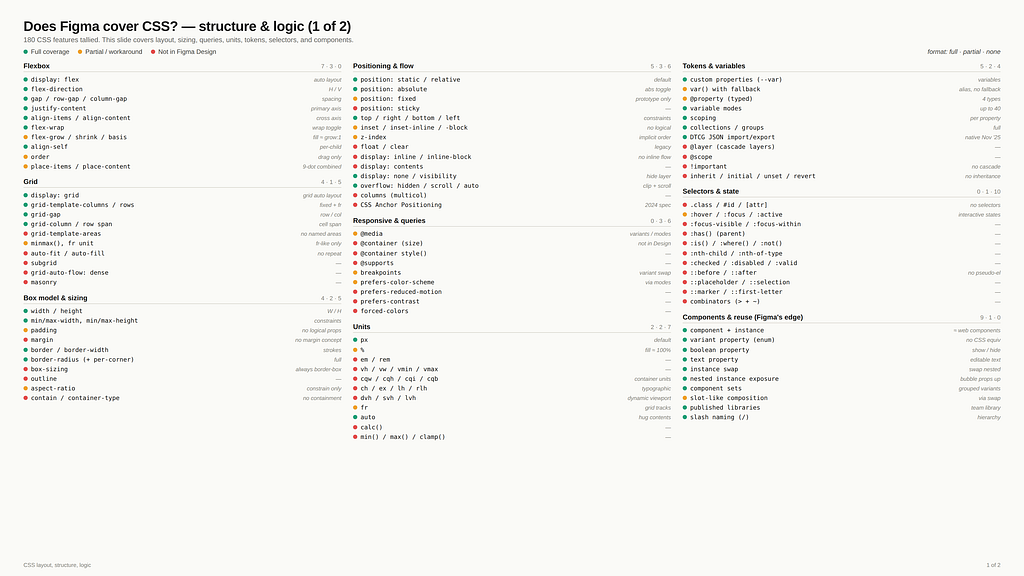
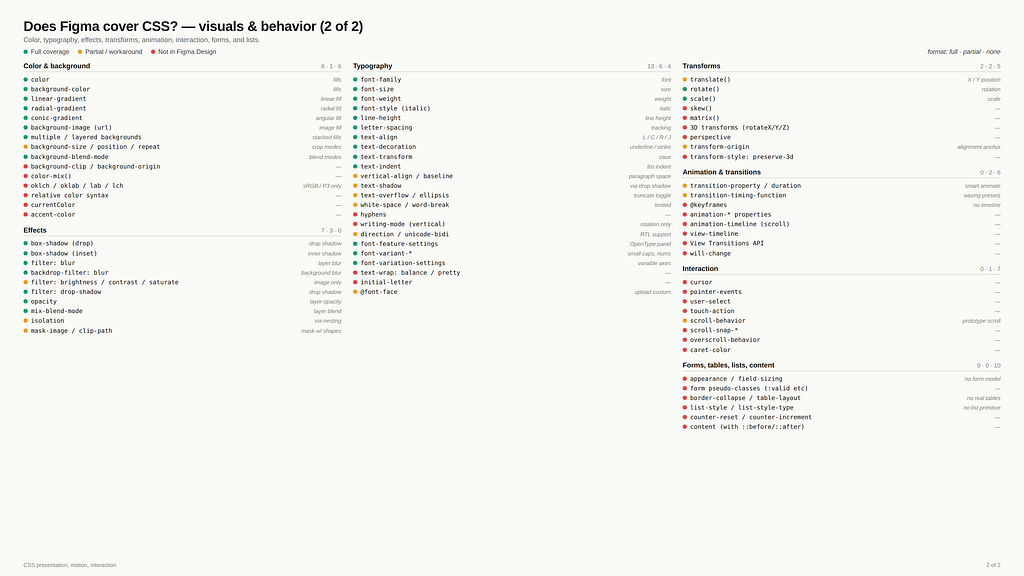
Here is the part to understand, because it looks like a flaw and it is not. Figma expresses only about a third of CSS cleanly, and that number is not a bug. It covers the third, which is visual and static: layout, type, colour, spacing, and components. The rest of CSS is behaviour, logic and runtime. Focus states, container queries, selectors, interaction, the things that only exist once the page is live and a person is moving through it. So what we hand over is partial by nature, not by failure but that still means it is not ideal.
However, the “then just do not use Figma” is the wrong move in my opinion. You can generate stuff, but if you care about the creative process, you need a tool made for design, not a terminal. The gap is a reason to know Figma’s edges, not to walk away from the canvas. No other tool is built for this either currently, and cramming all of CSS into Figma is not the fix. Designers are already drowning. I spend half my life teaching teams auto layout and props, so trust me, drowning.
So, concretely, the work for designers is two things.
- Build clean, solid, structured files, the kind that can be read by an agent, can also become a catalog easier in the future: every state designed, semantic tokens that carry intent, names treated as a contract, and a real grip on components, variants, props, and slots, adding context to travel with components, all the features, you now need to know them inside out.
- Then know the gaps. Know where Figma stops and where you need a translation layer or simply a human has to step in, because no tool closes that gap for you today. The catalog like any other agentic design setup today still lives as hand-authored code, just past Figma’s edge, and nobody has built the clean bridge from one side to the other (yet).
So be very critical of anyone who tells you they have a smooth design (real design) to (real) code workflow with AI. Work with agents, absolutely, but make sure the human supervises. The person stays in the seam, on purpose.
Because here is the core of it. Design is thought on a canvas, with your hands, fast and visual, because that is the only way anything but generic comes out. The machine needs the opposite: a precise, structured, machine-readable source. Good design needs the canvas. The agent needs the system. And nothing today carries you from one to the other without losing something on the way. That gap is not a bug waiting for a patch. It is the shape of the problem, and for now, only a person can cross it.
The tool that finally lets a designer think on a canvas or similar creative environment and hand a machine clean-coded elements will decide how everything gets made. I have my fingers crossed for Config 2026.
Who is Christine Vallaure, the author
Christine Vallaure. UI designer, speaker, founder of the learning platform moonlearning.io and author of theSolo, a book about independent product building. I teach UI design, Figma, and product to the people who want to understand what is actually going on under the hood.
Online courses, team training, conference talks. If any of that is useful to you, come find me.
Currently focusing on course on agentic AI for designers. Sign to my newsletter if you want to know more.
Constitutionally incapable of writing a short article.
A2UI under the hood: Designing for the new era of radically adaptive UI was originally published in UX Collective on Medium, where people are continuing the conversation by highlighting and responding to this story.