
Mastering an AI tool isn’t learning its correct use. It’s learning to bend it to how you already think — and that kind of mastery is personal, divergent, and never finished.
Every designer is being told to use AI tools. Few of them are being told what it actually means to master one. And underneath both is a question almost no one is naming out loud in the tool onboarding: if the tools get good enough, what happens to the job?
Most organizations are trying to solve all three with a single training plan. It isn’t working. The designers I work with are excited and anxious in roughly equal measure, often inside the same moment. They’ve been handed a category of tool that doesn’t behave like the software they’re used to, and the conventional response — write a deck, run a workshop, declare mastery — keeps producing the same result: a room full of people who feel behind even when they’re trying so hard to get ahead.
This essay is about what happened when my team stopped trying to solve it that way. And about the word mastery itself — which I don’t want to abandon. I want to redefine it.
/
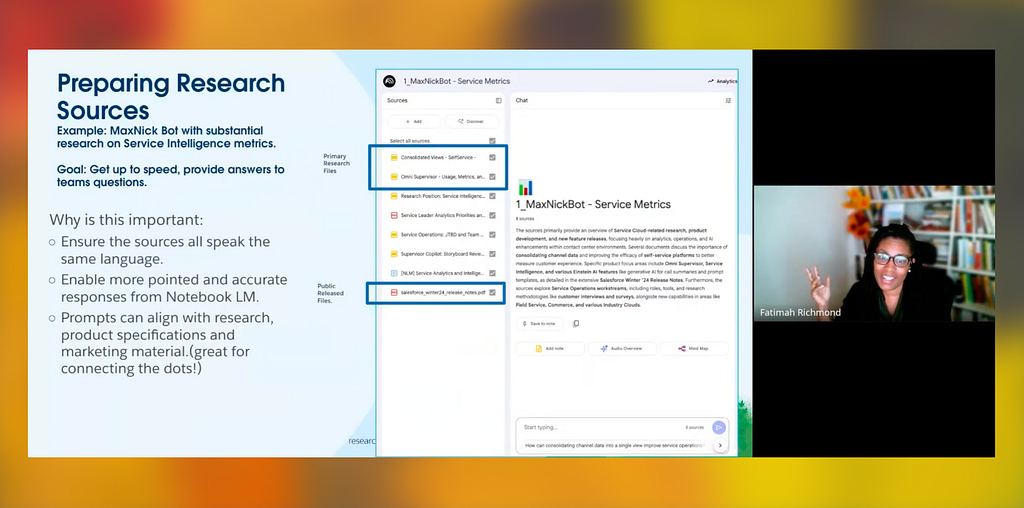
October 1st, 2025. Eighteen people on a video call, a few minutes before nine in the morning PST. I want to start here because what Fatimah Richmond opened that session with did something I’d been waiting for someone to do for almost a year.
She said: “I’m not an expert.”
She is, of course. Just not in the way that matters here. Nobody is. That’s the whole point. Fatimah — UX researcher, published poet, twenty years in the valley, DeepMind on her resume — had joined the Salesforce Service UX team at the start of the year, coming out of a world where Gemini was the default tool for almost everything. She brings a researcher’s instinct for knowledge management and a storyteller’s territorial relationship with participant voice. She was exactly the right person to open our series — not because she had answers, but because she’d been quietly building a personal practice nobody else on the team had yet.
The tool she was about to show us was NotebookLM, a Google product for synthesizing large amounts of documents. She’d been using it to surface insights from years of accumulated Salesforce research — studies done by people who’d since moved on, knowledge living in documents nobody opens anymore. She called it “the intelligent notebook.” Not Google’s name for it. Hers. A mental model she’d developed herself, from her particular vantage point.
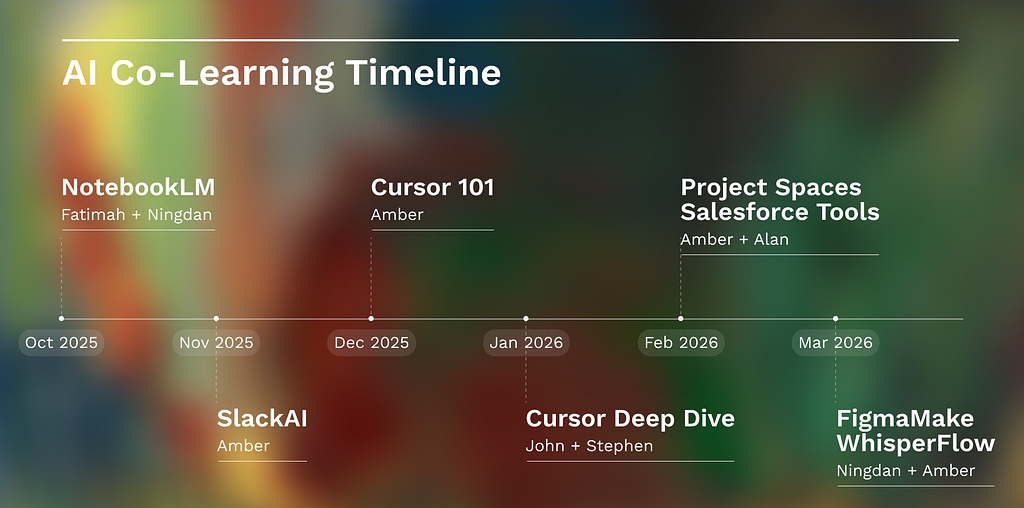
This was the first session of what became a six-month co-learning series for the Service UX team at Salesforce — forty-six designers across the US, India, and Israel, all trying to figure out the same thing: what do we do with these tools that are arriving faster than any of us can metabolize them?
Ningdan Zhang — senior product designer and my co-facilitator — and I designed the series together. That reframe matters early, because it changes what this essay is about. We created the structure together, the session-by-session scaffolding, the instinct for what the team needed week-to-week. We brought the hypothesis and the arc. Neither of us knew if it would work. This isn’t a retrospective. It’s a design case study — one that started with a shared question, ran for six months, and produced a finding I didn’t expect.
/
The problem we were designing for had a specific shape.
Designers on the team were experiencing a paradox: genuine excitement about AI tools running alongside significant anxiety about which ones to use, when, and how. Underneath that, the quieter question about whose jobs might not exist in two years. Announcements were coming fast. Structured guidance was overwhelming or missing. Everyone was figuring it out independently — duplicated effort, inconsistent workflows, the pressure to have a vibe-coded prototype to show without any shared foundation yet for how to build one.
Our hypothesis was simple, maybe naïve: what if we just learned with each other? Two thirty-minute sessions a month. One tool, one job-to-be-done, one deep-dive tool 101 session, one person willing to share what they’d actually figured out — imperfectly, in progress, without having to have the answer. We covered whatever the team was asking for: NotebookLM, Slack AI, Cursor, project spaces (Claude, Gemini Gems, OpenAI), Salesforce Design System tools, Figma Make, Wispr Flow.
What we didn’t anticipate was what the format would reveal about the nature of the tools themselves — and about what mastering them actually means.
/
There’s a category error that happens when organizations try to teach AI tools the way they teach other software.
Traditional software training works because the tools are deterministic. You learn where the buttons are, what the shortcuts do, how the system behaves when you click the thing. Mastery, in that world, converges — everyone arrives at roughly the same competence, following roughly the same path, and you can write a training deck for it. Mastery means knowing the tool’s correct use.
AI tools break that definition. Maggie Appleton — designer and anthropologist, now at GitHub Next — gave a talk in 2023 called “Squish Meets Structure” about designing products with language models, and the line from it that I love is her description of the magic-input box: it has “no affordances,” “no knobs or door handles.” The interface, she writes, “offloads a ton of cognitive labour to the user.” There is no correct use to learn. The tool meets you where you are. Which means what you bring to it — your instincts, your mental models, your accumulated taste, your willingness to iterate, your custom claude.md files — is the tool, as much as the model is.
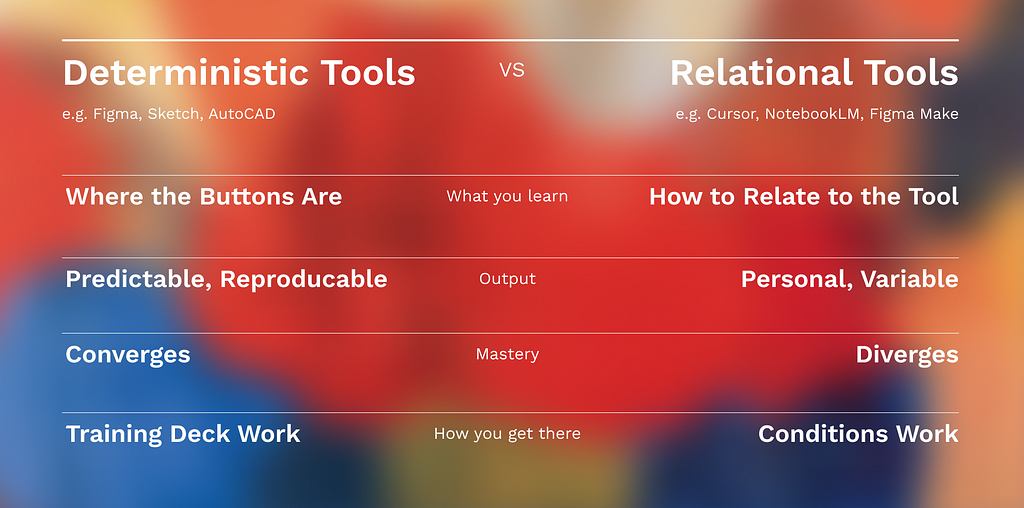
So mastery hasn’t disappeared. It has shifted. With deterministic software, mastering the tool meant converging on its logic. With AI tools, mastering one means the opposite: learning to bend it toward your logic. Tailoring it to how you already want to work. Mastering an AI tool is the craft of making it amplify the specific strengths and experience you bring — so the work that comes out is sharper, and unmistakably yours. That kind of mastery is real, and hard-won, and worth teaching toward. It is just personal rather than universal. Divergent rather than convergent. Everyone’s version of it should look different, because everyone’s version is built out of a different person.
This is what most training plans get wrong. They aim designers at the old kind of mastery — a single competence, ratified by a curriculum — when the thing actually worth reaching is the new kind. And the new kind can’t be transferred by a deck. Top-down mandates fail not because designers are resistant, but because you cannot hand someone a good relationship with an AI tool. You can only create conditions where they build their own.
That’s not an argument against institutional support. It’s an argument for two layers working in tandem. The Salesforce UX Ops team does essential work that a peer series like ours could never do: approving tools, managing governance, rolling out learning modules and hackathons, navigating token budgets, unlocking access. They have been building the needed infrastructure — the scaffolding that makes scale possible. Without it, individual experiments stay isolated. But the kind of knowledge Fatimah was about to share — that lives in a thirty-minute session where a colleague shows you her actual notebooks, her workarounds, her personal information architectures, the thing she tried that didn’t work — can’t live in a module. The peer layer is where mastery, the personal kind, actually travels. Both are required. Neither replaces the other.
/
Back to Fatimah.
What made her session worth watching wasn’t the tool. It was the mastery she’d built around it — exactly the personal kind. She’d learned, through trial and error, that you can’t just put everything in — the notebook needs curation, sources speaking the same language, topics aligned so the reasoning engine isn’t “talking to someone who keeps going on tangents.” She’d added summary tabs to participant transcripts, not because any tutorial told her to, but because the raw transcript was too messy, too human. She’d discovered the audio feature was unreliable for her use case — research synthesis where tone matters, where a participant’s exact words carry weight — but could work well for onboarding a new stakeholder into three years of accumulated knowledge.
None of this came from documentation. It came from her — from twenty years of research practice, from a storyteller’s instinct to protect participant voice, from a researcher’s need to curate before she analyzes. The tool was the same tool everyone had access to. What she’d built with it was hers. She had taken a generic instrument and tailored it, precisely, to sharpen the work she already knew how to do.
Aditi Sharma, a senior product designer on the team, named what we were all watching without quite seeing it. In the post-mortem survey she wrote that what she valued in these sessions was “a window into someone’s thinking.” That phrase is the whole finding. When everyone uses the same buttons, watching a colleague work is informative but not revelatory. When mastery is personal — when the same tool produces wildly different work depending on who’s wielding it — watching someone use it well becomes a window into how they think. You’re not watching someone operate software. You’re watching them think exponentially.
When Nasahn Sheppard, our group VP, asked whether he was “using it wrong” by treating NotebookLM as a singular event rather than an ongoing knowledge base, Fatimah’s answer is why mastering these tools needs to be taught differently: “I feel like the verdict is out on what’s wrong or right. None of these tools tell us how to do it.”
That’s not a limitation. That’s the nature of the thing — and the reason mastery has to be personal.
/

January 28th. Stephen Coyner and John Vollmer, Design Architects from the Salesforce Field Service team, joined to share what they’d been building with Cursor. Casually. No agenda. Just: here’s what I made.
Stephen had built a transit analysis platform. Backend, frontend, API connections, real King County Metro routes, fake ridership data he generated himself using Claude. No prior coding experience. He’d been working on it for about a month.
He described the process as collaborating with “an up-to-speed developer friend.” Not using a tool. Working with a collaborator. The language matters. Maggie Appleton has a name for what Stephen was doing: in her 2024 Local-First Conference keynote, “Home-Cooked Software and Barefoot Developers,” she borrows from the barefoot doctors of 1950s and 60s China — people given basic training who returned to their own communities to provide essential care. The barefoot developer is the same figure, ported to software: not a professional coder, but someone embedded deeply enough in a domain to understand its real problems, now able to build for it. That embeddedness is the point. Stephen wasn’t trying to become a developer. He was mastering Cursor in the way that mattered — bending it toward the domain expertise he already had, so the tool sharpened work only he was positioned to do.
It’s worth saying that the idea is older than the tooling. Appleton credits Clay Shirky’s 2004 essay “Situated Software” — software made by and for the specific local community it serves — as the same claim, made twenty years before it was feasible to be disruptive. Shirky could only describe it as something that fits cutely into the landscape of software. What changed isn’t the desire. It’s that language models, trained on all the abstractions other people built, finally supplied the substrate to proliferate software specificity.
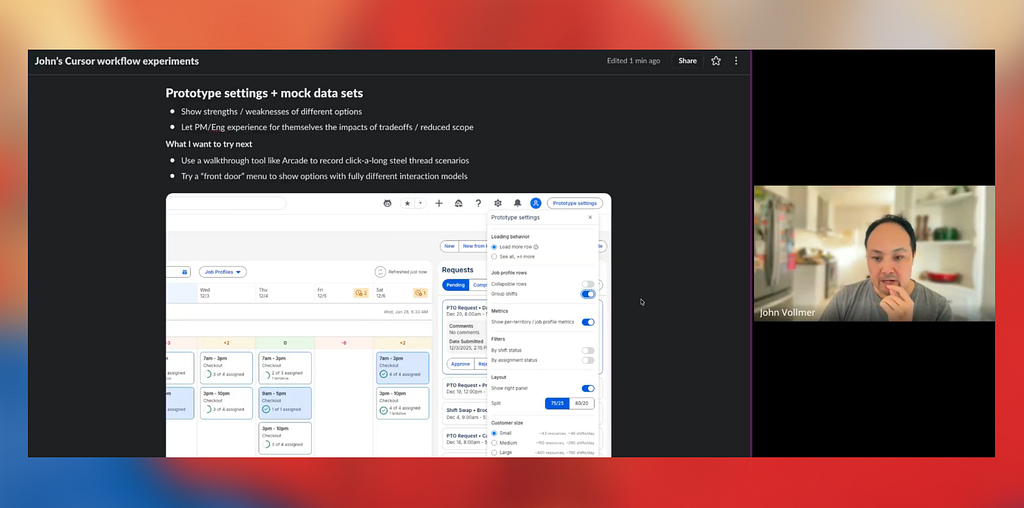
John, meanwhile, had built a shift management prototype with a settings panel for toggling features on and off. The solution landed at exactly the right moment. Several people on the team had been wrestling with the same problem — how do you show a stakeholder one version of a flow, and a different stakeholder another, without rebuilding the prototype from scratch each time? Watching John’s approach, that single idea unlocked something for the whole room. He’d also figured out how to deploy to Heroku with Cursor walking him through the entire process, including password protection. He’d mastered the tool by doing something real with it.
What struck the room wasn’t just the polish. It was the specificity. Both had invented solutions to problems they’d actually encountered. What traveled wasn’t technique. It was disposition: the willingness to start something without knowing where it would go, to treat the AI as a collaborator in the uncertainty rather than a tool to be conquered before use. That disposition is the entry point to personal mastery — and it turns out to be the part that’s contagious.
/
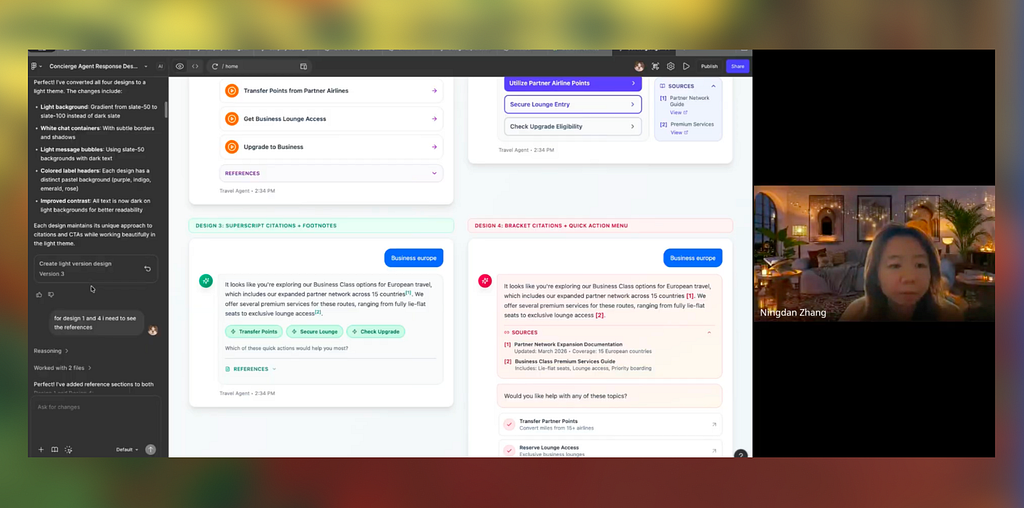
March 11th. Ningdan took the session to share her work with Figma Make.
This one was different. Not because the tool was different — though it was — but because of who was sharing it. Ningdan wasn’t a guest. She’d been co-designing and co-facilitating these sessions with me from the beginning, shaping the arc of the series alongside me, week after week. When she shared her workflow, it wasn’t a presentation. It was a disclosure. Here’s what I’ve been figuring out — the same way each of us has been.
She showed three projects. One: generating four different design options from a single prompt for a concierge agent reply, saving the time it would have taken to manually assemble each variation. Two: stress testing edge cases in conversational interfaces — what happens when there are no automations? When there are too many citations? When a paragraph runs long? The need for a “view more” action became obvious as soon as she could see content exceeding three items rendered at speed. Three: creating presentable options for stakeholder review, wrapping explorations into a clean format that made feedback easier to give and receive.
She was also honest about the frustrations. The credit system is opaque and expensive. Version control doesn’t really exist — you duplicate files and hope. Array-based edits break in ways that feel arbitrary. And there was the problem she named that I hadn’t heard anyone articulate before: Figma lag. The generated artifact moves faster than the Figma file. The document that’s supposed to be the source of truth becomes a historical record of an earlier moment in thinking.
This was mastery in the making. Not polished best practice. The real, current, imperfect negotiation between a skilled designer and a tool that didn’t always do what she wanted — a designer tailoring the tool, in real time, to the way she works.
The survey feedback on her session was specific: “Ningdan sharing how she uses Figma Make was useful for just getting a jump start.” Not inspiring. Not transformational. Useful. Concrete. The difference between watching someone explain a tool and watching someone actually use it — with all the friction visible — is the difference between a map and a territory.
/
Six months in, Ningdan and I had designed for tool adoption and accidentally created conditions for something more intimate. Seeing each other work. Seeing the specific choices someone makes when the tool doesn’t behave, the workarounds they’ve invented, the mental models they’ve constructed to make sense of something genuinely new. A window into someone’s thinking — and into how each person was mastering these tools in a shape no one else’s would match.
And once you can see the thinking, you can see the worry too. Amanda Harris, a User Experience Architect on our team, named a tension directly in the post-mortem: “I worry that we’ll lose the exploratory aspects of finding what’s wrong with an idea by jumping so quickly into hi-fi prototyping.” That’s not resistance to new tools. That’s a designer protecting something she knows matters. Hearing it voiced — in a room where everyone is nominally learning the same things — is only possible in a setting small enough and safe enough for honest uncertainty.
The anxiety designers are feeling is a signal, not a weakness.
Annie Huang, a content designer on our team, put the other half of it plainly: seeing what people she knows well share feels “tangible and possible in a way that a concept walkthrough doesn’t. That ‘I want to do that too’ feeling is hard to beat.” What travels in a show-and-tell isn’t just information. It’s permission. Permission to try, to fail, to not have it figured out yet — because you just watched someone you respect admit they don’t have it figured out either.
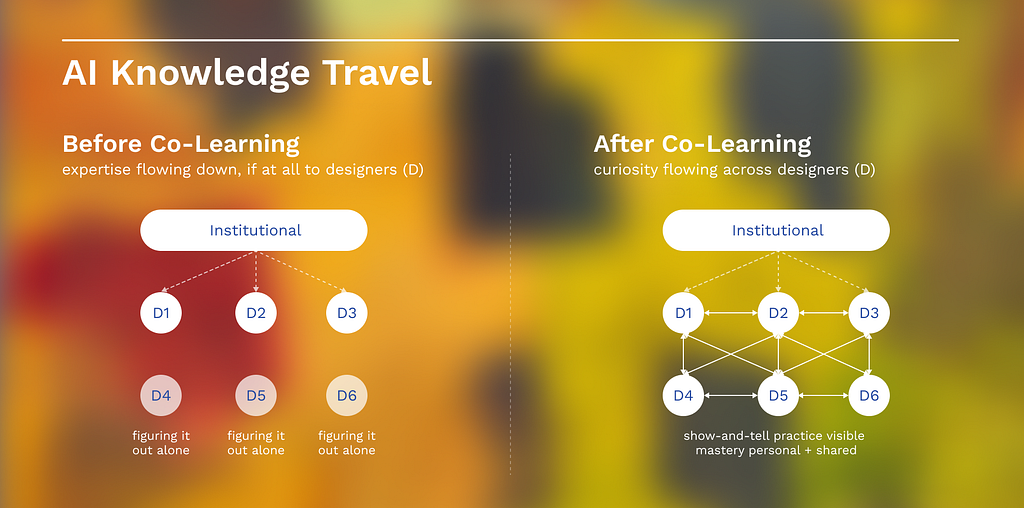
That’s what peer learning at the edge of uncertainty actually looks like. Not expertise flowing down. Curiosity flowing across.
/
The tools will keep changing. They will keep arriving faster than any module can be written, any best practice can be documented, any official curriculum can ratify. It is tempting to treat the peer layer as a bridge — something to lean on until the real training arrives. But the real training is not coming, because there is no fixed competence to train people toward. As long as the tools keep moving, the peer layer isn’t the bridge. It’s the ground.
We did design how designers master AI. We just found that mastery wasn’t what we thought it would be. Not a competence everyone arrives at, but a practice each person builds — bending a generic tool toward their own strengths, their own experience, their own way of working, until the work it helps them make is sharper and theirs.
That is what mastery means now. Not just knowing the tool. Knowing yourself well enough to make the tool an extension of how you already think. It is personal. It is never finished. And the room where it travels is the one worth designing.
This article was written in collaboration with Claude using writing style instructions I developed by analyzing my own previous work. Read full process here. If you read my early work, you’ll find I was a fan of overusing the em-dash way before LLMs ever were.
Many thanks to everyone who participated in the co-learning. You can find more out about my amazing colleagues I mention here: Ningdan Zhang, Amanda Harris, Annie Huang, Aditi Sharma, Fatimah Richmond, John Vollmer, Stephen Coyner, and Nasahn Sheppard.
Shout out to Maggie Appleton and Clay Shirky whose prior thinking helped me shape my perspective in this essay.
Designing how designers master AI was originally published in UX Collective on Medium, where people are continuing the conversation by highlighting and responding to this story.