


NOTE: In mid-2025, Coursera rolled out Preview mode, that replaces Audit mode for most courses.
Here at Class Central, we get asked all the time whether Coursera courses are really free. The Coursera user interface (UI) is designed to push learners towards Coursera’s paid offerings, and it may confuse new learners regarding what’s free on the platform and how to sign up for it. So we decided to write a guide to help you.
Note that if you know where to look, Coursera still offers some free courses. We’ve compiled them all here: 470+ Coursera Courses Still Completely Free.
Shortcuts
Click on a link to jump to that section:
- How to Enroll in Coursera Courses for Free?
- What is Coursera?
- Can you get a Coursera Certificate for Free?
- Free Certificates From Other Providers
- Is Coursera Still Free?
- How to Audit Coursera Courses (Hint: You Can’t)
- What if the Preview link is not visible?
- Full Course, No Certificate
- Partner-Supported Free Access
- What is Coursera Plus?
How to Enroll in Coursera Courses for Free?
In brief:
- Most courses are paid-only. Look for the $ symbol on the Class Central page. Generally, you can sign up for a 7-day free trial or a free preview
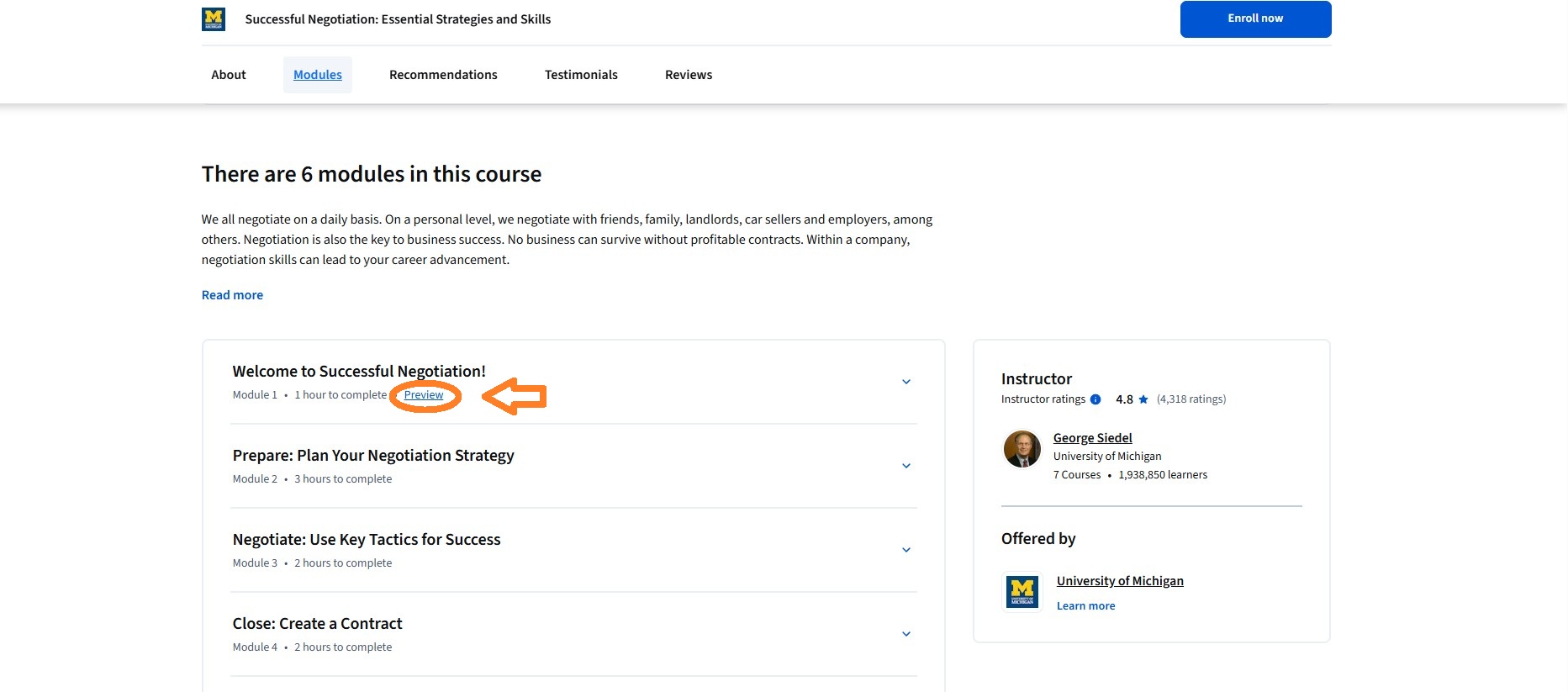
- To avoid providing a payment method (credit card or PayPal) to Coursera, look for a link to Preview the course on individual course pages. The Preview option is not available on Specialization, MasterTrack, or Professional Certificate pages, so you need to navigate to the individual course page first
- Some courses include assessment items (but no certificate) for free. Simply sign up for Full Course, No Certificate
- Some courses have Partner-supported free access which is the equivalent of the previous Free Audit mode. You can access the full course, with the option to purchase a certificate when you complete the course
- If you are unable to pay, you can apply to Coursera for Financial aid.
Read on for more details.
What is Coursera?
 Coursera is an online education provider that offers online courses, popularly known as MOOCs or Massive Open Online Courses, from top universities around the world. These partners include Stanford, Duke, Penn, Princeton, Michigan, Peking, and HEC Paris. Coursera also partners with companies including IBM, Google, and Amazon/Amazon Web Services (AWS) — these companies have also launched courses on Coursera. Currently it has more than 350 partners from around the world.
As well as individual courses and online degrees, Coursera offers 2000+ groups of courses in English and other languages known as Specializations, Professional Certificates, and MasterTracks. Some groups of courses can be used as credit towards degrees available through Coursera.
Can you get a Coursera Certificate for Free?
Certificates were free in Coursera’s early days. Unfortunately, you can’t get a free certificate for completing Coursera courses now. You can, however, apply for financial aid for most courses if you can’t afford to pay the full price. If approved, the amount of financial aid may depend on your circumstances and geographical location. Previously, the Financial aid available link was next to the Enroll button, but now you need to scroll down to the FAQ section.

Some providers have stopped offering free certificates for completing their online courses although many free certificates are still available from a range of providers.
Free Certificates From Other Providers
Here are some popular collections of free certificates and badges from various providers:
- Massive List of Thousands of Free Certificates and Badges
- 600+ Courses from Top Med Schools with Free Certificate & CME Credit
- 900+ Open University Free Certificates
- 450+ Free Google Certificates and Badges
- Harvard Computer Science Free Certificates
For more free certificate courses, visit Class Central’s free certificates articles.
Is Coursera Still Free?
Yes and no. At the time of writing this article, a big majority of the courses have some free material (including some graded items). Generally, this is either free Preview mode, where you can access the whole of the first module, or a 7-day free trial. You will need to pay to access the rest of the course materials for most courses on Coursera. If you complete a course within the free trial period, your certificate will not arrive until after your first subscription payment has been made.
These are indicated on Class Central by a small $ symbol, as you can see below:

However, Coursera still has some courses for which even the graded assignments are completely free. These completely free courses do not offer any way to receive a certificate.
You must sign up (Join for Free) with Coursera before you can see the price. Your Class Central account is not the same as an account with Coursera.
How to Audit Coursera Courses (Hint: You Can’t)
For years, Coursera called having access to the free portions of a course “auditing the course.” I (Dhawal) first came across this concept of auditing when I went to Georgia Tech, where I got my Masters in Computer Science. I got my undergrad degree in India and we didn’t have the concept of auditing there.
Here is a quick definition: Auditing a course allows a student to take a class without the benefit of a grade or credit for a course.
With changes to the platform in mid-2025, Coursera has replaced Audit with Preview.
Coursera keeps tweaking their UI or testing different iterations so what’s on your screen on Coursera’s website may be different from our screenshots.
To avoid providing your payment details to Coursera, you need to select the Preview link.
What if the Preview link is not visible?
First, you need to find the course page. You cannot sign up for free via Specialization pages.
Most newly launched courses are part of a Specialization or Professional Certificate. Some older courses that were around twelve weeks long have been converted into Specialization format, with the original course split into multiple courses.
Professional Certificate and Specialization pages do not allow you to sign up for a single course. If you click on the “Enroll for Free” button, you will only be given an option to subscribe to the whole Professional Certificate or Specialization.
To preview courses without needing to provide payment details, you need to find the individual course pages. If you scroll down a bit you will see a list of courses that are part of the Specialization. Click on a course name to go to the single course page.
Unfortunately, even though it lists the courses in the Specialization, the Specialization page may not necessarily link to the individual courses via the course name links. In this case, to visit the course’s page, copy the course name and paste it in the search bar on Coursera. Better yet, you could search for the course on Class Central — https://www.classcentral.com/search. We will also show you results of similar courses that are not on Coursera.
When you are on the course page, select the Enroll button and look for a Preview link as shown above. You may need to scroll down to the Modules to see a Preview link for the first module.
Because some courses are part of more than one Specialization or Professional Certificate, you may see a pop-up like this one. Click Next, or first select a radio button to change the program.

The next screen shows the Preview link.
Full Course, No Certificate
This pop-up appears for courses with free access to graded assignments. Simply select Continue on the Full Course, No Certificate pop-up. You cannot receive a certificate for any of these courses. See our list of completely free courses.

Partner-Supported Free Access
The free-to-audit option is now known as partner-supported free access. Few courses have this.
DO NOT click on the Enroll for free button. Instead, you can access the whole course (including graded items for some courses) for free by scrolling down to the Frequently asked questions section and selecting the learn more link. After completing the course, you have the option to purchase a certificate.
See our list of partner supported free courses.

What is Coursera Plus?
The pop-up may include Coursera Plus information, but you are still looking for a Preview link.
Coursera Plus is a single payment that gives you access to most courses in the catalogue for 12 months, including assessments and certificates. While not free, if you want certificates for several courses or Specializations, it may be a worthwhile investment. Or if you don’t want to commit to a whole year, Coursera Plus is also available in many countries as a monthly payment.
We hope you found this guide useful. Please let us know if you find a Coursera course that doesn’t fit the patterns described above.
The post Guide: How to Sign up for Coursera Courses for Free appeared first on The Report by Class Central.