
Why Universal Design For Learning Matters Beyond The Classroom
Universal Design for Learning (UDL) is becoming more important as organizations train employees with different backgrounds, languages, abilities, roles, digital skills, knowledge, and work settings. Still, many programs are built for an „average learner.“ Everyone gets the same content, follows the same steps, and shows understanding in the same way. This one-size-fits-all approach might seem efficient, but it often leads to unnecessary obstacles. Some employees have trouble accessing the content. Others find it hard to relate it to their jobs, and experienced learners have to go through material they already know.
UDL takes a more flexible approach. Rather than waiting for problems and then making adjustments, L&D teams plan for different learner needs from the start. They create several ways for people to participate, get information, practice skills, and show what they know. For organizations, UDL is a strategic approach to designing learning that can improve onboarding, compliance training, leadership development, reskilling, software training, and other workplace learning.
What Is Universal Design For Learning (UDL)?
Universal Design for Learning is a framework for improving and optimizing learning by creating experiences that account for the different ways people learn, instead of assuming everyone is the same. It was developed by CAST to help remove barriers in schools, workplaces, and other learning settings.
Some people think Universal Design for Learning just means offering content in different formats. But the full UDL framework does much more. It can shape:
- Learning goals
- Content and materials
- Instructional methods
- Practice activities
- Assessments
- Learning technology
- Physical and digital environments
- Feedback and support
In short, UDL considers the whole learning experience, not just whether a course includes a video, transcript, or downloadable file.
The main idea is simple: people learn in different ways, and this is normal and expected. Employees will start a program with different backgrounds, motivations, communication skills, and learning situations. So, learning experiences should be flexible yet have clear, consistent goals.
„Universal“ does not mean creating a single solution that fits everyone the same way. It means building flexible options from the start so more people can join in and take on challenging learning.
What Are The 3 Principles Of Universal Design For Learning?
Universal Design for Learning is based on three main ideas: offering different ways to engage students, present information, and let them show what they know. These principles help educators think about why students get involved, how they learn, and how they show their understanding.
UDL principle |
Core design question |
Workplace learning example |
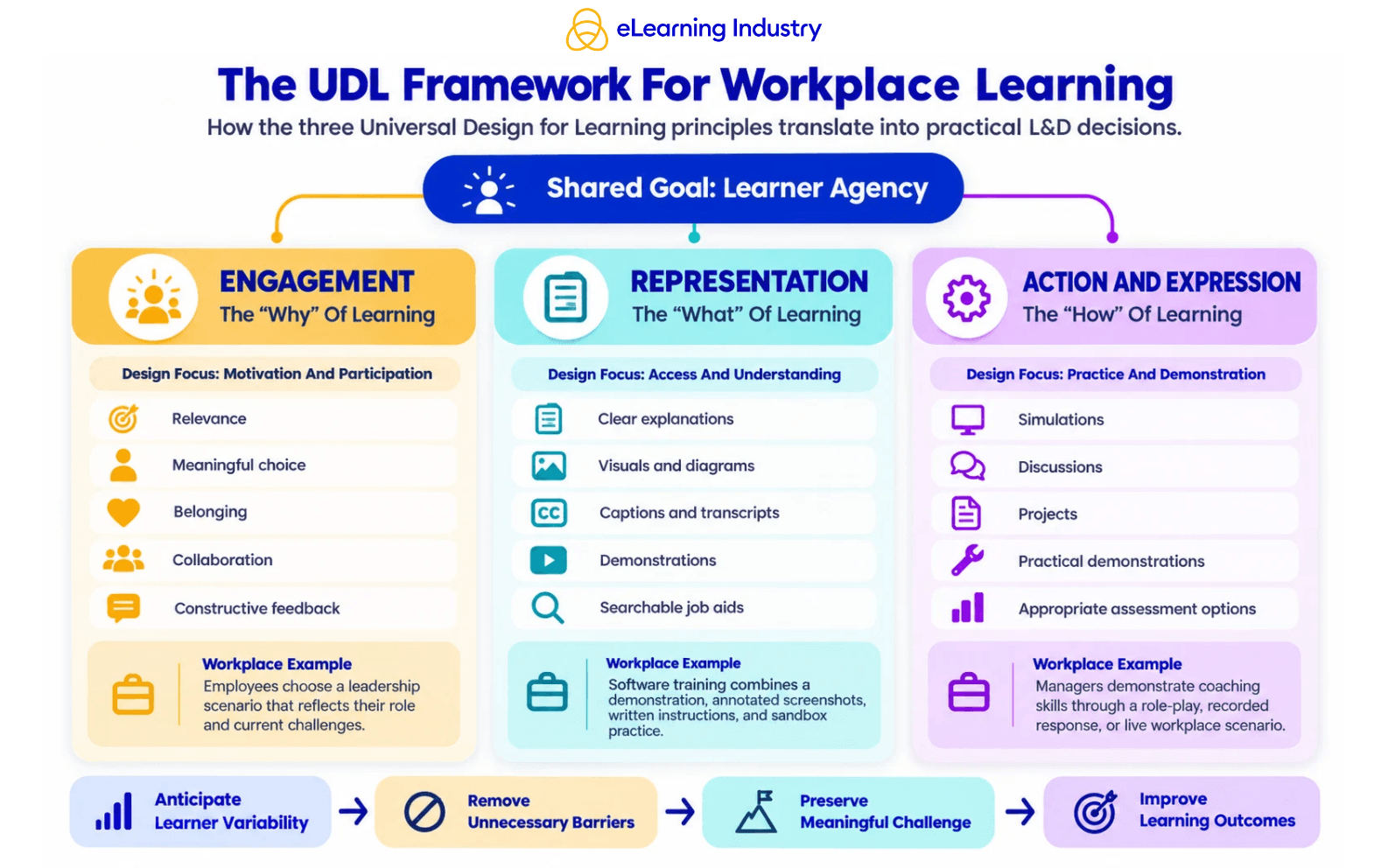
| Multiple means of engagement | Why will employees participate and persist? | Let learners choose scenarios relevant to their roles. |
| Multiple means of representation | How can employees access and understand the information? | Combine explanations, visuals, demonstrations, captions, and examples. |
| Multiple means of action and expression | How can employees practice and demonstrate learning? | Use simulations, discussions, projects, written responses, or practical demonstrations. |
1. Multiple Means Of Engagement
Universal Design for Learning encourages different ways to engage people by focusing on motivation, relevance, a sense of belonging, challenge, persistence, and participation.
Employees are more engaged when they see why the learning is important and how it relates to real workplace challenges. For example, rather than giving every manager the same case study, an L&D team could offer scenarios about remote leadership, performance conversations, conflict management, or team motivation.
Giving learners choices can help them feel more in control, but those choices should be meaningful. Simply offering lots of decorative options does not improve learning. The aim is to make decisions that help learners connect the experience to their roles and goals.
Engagement can also mean encouraging people to work together. Peer discussions, team problem-solving, mentoring, and shared reflection help employees learn from each other. Still, collaboration should not always be required. Some learners may need time to reflect or practice on their own.
2. Multiple Means Of Representation
Universal Design for Learning uses different ways to present information so understanding does not rely on just one format, language style, or sense.
An important procedure can be shown with a clear explanation, a labeled diagram, a short demonstration, and a searchable job aid. These are not separate learning objectives, but different ways to help employees reach the same goal.
Representation also means helping people use what they already know. Before teaching a new process, designers might use a quick quiz, an analogy, a concept map, a demonstration, or a reflection question to link existing knowledge to the new topic. CAST’s current UDL Guidelines recommend connecting prior knowledge to new learning and making needed information available when learners need it.
This approach is especially helpful when training people from different backgrounds, career changers, new hires, or employees starting new roles.
3. Multiple Means Of Action And Expression
Universal Design for Learning offers different ways for learners to interact, practice, communicate, and show what they know.
For example, employees learning to coach team members could analyze a conversation, join a role-play, record a response, or show the skill in a live scenario. The goal is still to coach effectively, not just to finish a specific assignment.
UDL does not mean employees can skip essential skills. If a job requires giving a verbal presentation, an assessment must still check that skill. Flexibility should remove barriers that do not matter to the outcome, but keep the challenge that makes learning meaningful.
What Are The CAST UDL Guidelines 3.0?
The CAST UDL Guidelines put Universal Design for Learning into practice. These guidelines offer design ideas that help educators, Instructional Designers, curriculum developers, and learners use the framework.
CAST released Universal Design for Learning Guidelines 3.0 on July 30, 2024, and the official site lists this as the current version. This update is important for professionals because it places greater emphasis on identity, belonging, bias, exclusion, interdependence, and learner agency.
The CAST Universal Design for Learning Guidelines 3.0 retain the three main principles and add more detailed points under each. The main goal of the framework is to support learner agency, which is:
- Purposeful and reflective
- Resourceful and authentic
- Strategic and action-oriented
The current CAST UDL Guidelines also encourage learning designers to include different perspectives, address bias in language and symbols, promote teamwork and group learning, support a sense of belonging, and challenge practices that exclude others.
Another important update is the focus on emotional capacity. In this UDL framework, emotional capacity means helping learners understand expectations and motivations, become more aware of themselves and others, reflect on their progress, build empathy, and manage their emotions to support learning. CAST also warns that learners should not be expected to deal with unfair environments alone.
A UDL chart or graphic organizer can help teams think about these ideas. However, the Guidelines are not meant to be a checklist for compliance. Courses do not need to include every possible option. Designers should choose UDL strategies that address real barriers and support the intended goals.
Universal Design For Learning Examples In Corporate L&D
UDL is most helpful when its principles guide actual teaching choices instead of staying as just theory. Here are some examples of how UDL can be used in typical workplace learning programs.
Learning program |
Potential barrier |
UDL approach |
| Employee onboarding | New hires receive too much unfamiliar information at once. | Provide role-based pathways, process maps, short videos, searchable resources, transcripts, and manager check-ins. |
| Software training | A single demonstration moves too quickly for some employees. | Combine demonstrations, annotated screenshots, written steps, sandbox practice, adjustable playback, and job aids. |
| Leadership development | Generic content feels disconnected from managers‘ responsibilities. | Offer role-relevant scenarios, peer discussion, reflection, coaching practice, and workplace application projects. |
| Compliance training | Employees click through content without applying it. | Use realistic decisions, concise explanations, practice scenarios, corrective feedback, and accessible reference materials. |
| Skills assessment | One assessment format measures an unrelated skill. | Allow appropriate alternatives that assess the intended competency rather than defaulting to writing, presentation, or technology proficiency. |
Think about a coaching program. If you want to see if a manager can lead a constructive performance conversation, asking for a long written essay might test writing skills as much as coaching skills. Using a recorded simulation, live role-play, or structured conversation can show the intended skill more clearly.
Similarly, adding captions to a video helps with accessibility, but it is not enough for a full UDL strategy. The video also needs to be relevant, well-organized, easy to use, and linked to chances for practice and feedback.
How To Apply UDL To Learning Design
When using Universal Design for Learning, start by focusing on the outcome employees need to achieve, rather than starting with a list of formats or technologies. Here are five practical steps to put this approach into action.
1. Define the essential learning goal.
Be clear about what employees should know, decide, create, or do. Remove any requirements that are not necessary for the outcome. Consider if a certain format is truly needed for the skill, or if it is just the way things have always been done.
2. Identify possible barriers.
Look at the learning experience from different perspectives. Think about things like prior knowledge, language, navigation, time, accessibility, mental effort, motivation, technology, and chances to practice.
You might ask questions like these:
- Does the course expect learners to know things they might not already know?
- Is important information only offered in one format?
- Does the assessment actually test the skill you want to measure?
- Could the platform make it hard for some employees to take part?
- Are the examples useful for people in different roles, locations, or backgrounds?
3. Build options using the three UDL principles.
Think about engagement, representation, and how learners can demonstrate what they know. Offer only the options that help learners get past real barriers and reach the goal.
4. Keep the challenge meaningful.
UDL is about removing obstacles that hinder learning, not making things too easy. Employees still need to think critically, practice, make choices, get feedback, and show their skills.
5. Review and improve the design.
Look at factors like completion rates, assessment results, learner feedback, support requests, accessibility issues, and where employees lose interest. Try to spot patterns instead of blaming every issue on the learner.
Over time, organizations can use what they learn to create UDL teaching and design standards that can be reused for learning goals, digital content, facilitation, assessments, buying tools, and quality checks.
How Learning Technology Can Support Universal Design For Learning
Technology can help make Universal Design for Learning more effective, but simply buying an LMS, authoring tool, or AI platform does not guarantee a UDL learning experience. Some helpful features to look for are:
- Captions and transcripts
- Keyboard navigation
- Screen-reader compatibility
- Adjustable playback
- Responsive design
- Searchable resources
- Multimodal content
- Branching scenarios
- Accessible assessments
- Multiple communication tools
- Downloadable performance support
- Personalized or role-based pathways
- Progress monitoring and feedback
However, features are only valuable when they support thoughtful learning design. For example, a platform might let you add video, audio, and text, but if the explanation is confusing, offering it in three formats does not solve the real teaching issue.
In the same way, adaptive technology can personalize learning paths but might still reinforce harmful assumptions or limit learners‘ choices. AI-generated content can quickly create options, but these still need to be checked for accuracy, accessibility, relevance, representation, and bias.
Even employee engagement software has its limits. It can help with communication, feedback, or quick surveys, but it cannot replace clear goals, meaningful practice, accessible content, or effective assessment.
Remember that technology is a tool that supports learning, but UDL is still about thoughtful design.
Conclusion
The real value of the UDL framework is that it changes how organizations find problems. Rather than asking why an employee did not fit a set learning experience, designers look for barriers the experience created and how to remove them. This change can make learning more inclusive, but it can also raise learning quality, improve efficiency, and help scale programs for different groups. In the end, Universal Design for Learning should shape how organizations set goals, choose technologies, create content, design assessments, and check if learning is effective.