

What Is Customer Training? Definition, Benefits, And How It Works
Imagine you’ve just bought a new gaming software platform. You’re excited to try it out, but once you open it, the features seem overwhelming. You’re not sure where to begin or which tools to use. This can be really frustrating. That’s where customer training comes in to help.
Training customers is only one part of a larger effort to boost product adoption and loyalty. In this article, you’ll learn where customer training fits, what benefits it brings, and what challenges you might face.
What Is Customer Training?
Customer training is the process companies use to teach customers how to get the most out of their products and services. Trainers use clear learning materials and hands-on instruction to show customers what the product can do, how its features work, and how to use them for their needs.
For example, if you offer accounting software to corporate clients, they need to learn how to create invoices, track expenses, manage payments, and generate reports. With customer training, product demos, videos, and workshops, users become more confident and are more likely to keep using your product.
Customer Training Vs. Customer Education Vs. Customer Enablement
Customer training, customer education, and customer enablement all aim to help customers use a product or service confidently, but each uses a different approach.
Customer Training
Customer training is mainly hands-on. Its goal is to share knowledge and help users get the most from a product by guiding them through key activities. This type of training is especially useful for new customers who need support as they begin.
Customer Education
Customer education goes beyond just teaching product use. It focuses on building knowledge, so customers learn about the product, the industry, and common challenges. The aim is to help customers understand the bigger picture, not just how to complete tasks.
Customer Enablement
Customer enablement is broader than training or education. It helps customers reach their goals by offering training, resources, educational content, and ongoing support. The goal is to give customers everything they need to use the product smoothly and achieve real results.
Check the table below to see the differences more clearly.
Differentiating Factor |
Customer Training |
Customer Education |
Customer Enablement |
Primary Focus |
Designed to teach product skills, features, tools, or workflows. | Aims to develop deeper knowledge and a wider understanding of the product or service. | Gives customers the knowledge, tools, and resources they need to achieve their desired outcomes. |
Mode Of Learning |
Live instructor-led sessions, demos, video walkthroughs, and tutorials. | User forums, self-paced courses, webinars, guides, and educational content. | A combination of contextual playbooks, training, workflow guides, in-app walkthroughs, and ongoing guidance. |
Expected Result |
Develop product literacy and increase user competency. | Gain knowledge of the product and long-term capability to make the most of the product. | Apply the knowledge gained to perform work and achieve specific goals. |
Customer Training Vs. Customer Service Training
Customer training and customer service training may sound similar, but they target different groups. The key difference is who you’re training and what you want them to achieve.
Customer Training
Customer training is for people who buy and use your product or service. It helps them learn how it works, what features and benefits it offers, and how to get the results they want. For example, if someone buys your project management software, you would train them to create projects, assign tasks, and track progress and deadlines themselves.
Customer Service Training
Customer service training is most effective for employees who will be working with customers. This includes anyone on the front lines, like support agents and service representatives. They can be trained to communicate well and acquire the technical skills needed to answer questions clearly, resolve complaints more quickly, and handle difficult situations professionally.
For instance, if a customer is having trouble setting up their account, customer training would show them how. Customer service training, on the other hand, prepares your support team to guide customers through the process, explain each step, and resolve any issues that arise.
Essentially, both aim to improve the customer experience. The difference is that customer training allows buyers to use your products independently, while customer service training prepares your employees to assist customers as needed.
Customer Training Vs. Onboarding: Training Across The Customer Life
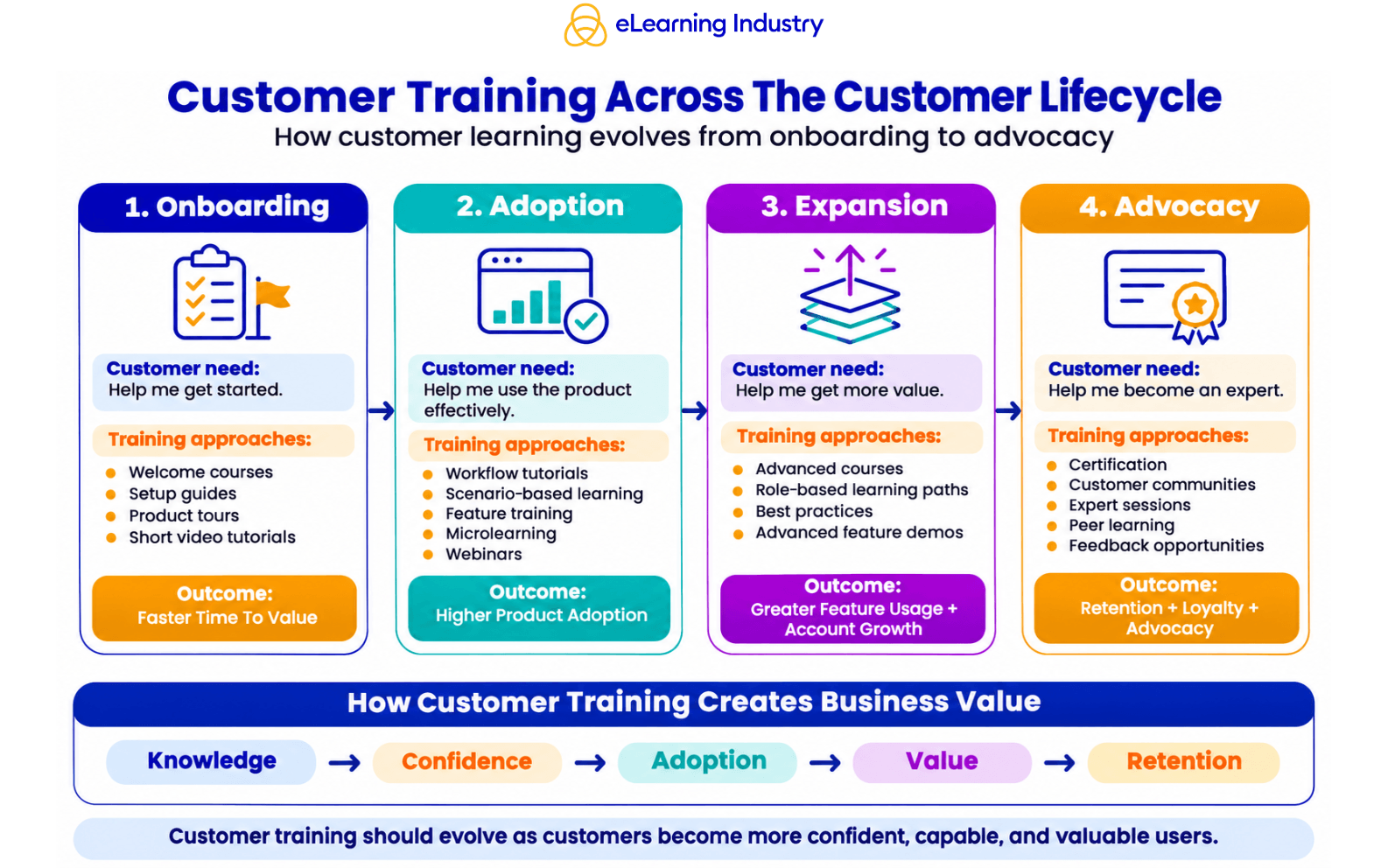
Customer training isn’t just for new buyers. You should keep educating your customers about your offerings, new features, and ways to help them reach their goals. This is where the customer lifecycle becomes important.
Think about a customer who signs up for a technical service. At first, they might need help setting up their account and learning the basics. Later, they could need support with advanced tools. After a few months, they may want to introduce the platform to a larger team and improve their workflow.
Customer needs change over time, so your training should too. Plan training for every stage of the customer lifecycle, not just as a one-time event. The table below lists training goals and examples for each stage.
Onboarding Stage
When you introduce your product to customers, they often need help getting started. Even if the features are simple, new users might not know which ones to use first or how to complete tasks. Make the first steps clear, help them set up accounts, and guide them through the interface. Welcome emails, short videos, and interactive tours can be very helpful if they get stuck.
Adoption Stage
After customers learn the basics, the next step is to encourage regular use. Show how your product features work in real-life situations. Walk them through common workflows and tailor your guidance to their experience. Offer extra training for customers who face recurring issues. For example, someone using basic project management tools might benefit from learning about automation, team collaboration, or reporting features.
Expansion And Advocacy Stage
During the expansion stage, customers might want to go beyond basic features as their business grows. They may need more user accounts, advanced functions, or features tailored to different business needs. Customer training can introduce these options through advanced courses, role-based learning, and practical demos. This helps customers make informed choices and focus on what matters most to them.
In the advocacy stage, customers know your product well enough to recommend it to others. You can encourage advocacy with certification programs, customer communities, expert sessions, and opportunities for feedback.
Benefits Of Customer Training
For Customers
Buying a product is one thing, but using it well is another. Customer training bridges this gap by giving you the skills and knowledge to make the most of your purchase. With the right training, customers can:
- Learn how to install and use the product effectively.
- Better understand all features and benefits.
- Work on tasks independently with fewer mistakes and less frustration.
- Use the product more often and reduce operational mistakes.
- Maximize ROI and get more out of your investment.
- Develop the skills and knowledge to troubleshoot problems without always needing to ask for help.
For Businesses
Customer training not only helps customers use your products more effectively, but also gives your business a chance to increase product adoption, build stronger customer relationships, and reduce repeat support requests. Here are some key benefits of investing in customer training.
Higher Product Adoption And Feature Use
When customers know how your product works, they are more likely to use it regularly. Good training helps them get past the early learning stage and see value sooner. They start using advanced features and make your product part of their routine, which benefits your business in the long run.
Lower Support Costs
If users aren’t trained, your support team may get too many repeated questions. Training helps customers learn how to use features and solve simple issues on their own. This means fewer support tickets and lets your team focus on tougher problems.
Stronger Retention And Lifetime Value
Customers who understand your product and continue to find value are more likely to stay. Training helps them discover new features as their needs change. These customers are more open to upsells, renewals, and account expansions, which increases their lifetime value.
What Happens Without Customer Training
Even great products can fail without proper customer training. If users can’t get what they need from your product, they may only use basic features or stop using it altogether. This leads to higher churn and more basic „how-to“ questions for your help desk. When customers aren’t satisfied, they’re less likely to buy again or recommend your product.
What A Customer Training Program Includes
A customer training program gives customers resources, activities, and guidance to use your product or service well. The aim is to make learning practical, easy to access, and useful for their needs. Here’s a look at common training formats and topics.
Common Formats
- Self-paced online courses
- Knowledge base articles
- Instructor-Led Training sessions
- Interactive product tours
- Step-by-step guides
- Live webinars
- Tooltips, pop-ups, and interactive checklists
Common Topics
- Onboarding, product setup, and initial integrations
- Essential features and common workflows
- Advanced functionalities and best practices
- Troubleshooting
- FAQs and contact support
How To Measure Customer Training Success
How can you tell if your customer training program is working? Start by tracking how many customers are completing the modules in your Learning Management System (LMS) reports.
Measure how well customers use what they’ve learned by looking at feature usage, course completion, assessment scores, product adoption, customer satisfaction, and support ticket numbers. Also, watch time to value and customer retention to see how training shapes the customer experience. Tracking these metrics often helps you spot gaps and improve your training.
Common Customer Training Challenges And How To Address Them
Customer training doesn’t always go smoothly. Low participation or old resources can hurt engagement and retention. Here are some common challenges you’ll need to address for successful customer training:
- Challenge: Customers lose interest when training sessions run long or get overly technical.
Solution: Keep lessons short, interactive, and relevant to customers‘ needs - Challenge: Customers have different learning needs, so the same training materials don’t work for everyone.
Solution: Create individual learning paths for beginners, intermediate users, and experienced customers. - Challenge: Busy customers don’t always get the time to attend scheduled sessions.
Solution: Offer recorded product demonstrations, on-demand tutorials, and self-paced courses - Challenge: Outdated training materials can lead to inaccurate instructions.
Solution: Review and update learning resources whenever your product features change.
Explore Customer Training Platforms
To plan an effective training program, you need the right resources. We offer a wide range of learning solutions, training resources, and platforms to help businesses of any size create, deliver, and manage customer training programs. Whether you’re starting fresh or updating your current program, our resources can help you find options that fit your customers‘ needs and your business goals. Check out our directories of LMSs and authoring tools for customer training today!